
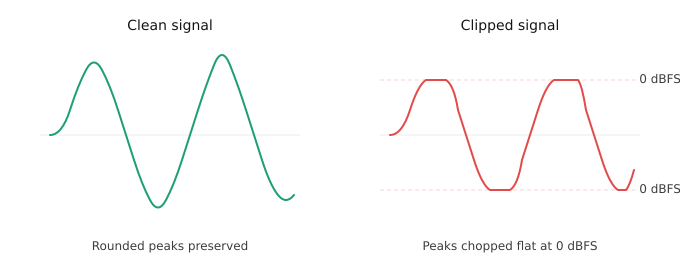
Clipping in audio occurs when a signal exceeds the maximum level your equipment can handle, causing the peaks of the waveform to get cut flat and the audio to distort. In digital audio, that ceiling is 0 dBFS, and crossing it means your DAW replaces the rounded tops of the waveform with flat lines that produce a harsh, broken sound.
The old studio rule sums it up perfectly, green is clean, red is dead. If your meters are hitting red during recording, you're losing information that no plugin can reconstruct. Clipping during playback or mixing is fixable. Clipping during recording is permanent damage to the source file, and no amount of post-production will bring back what the converter threw away.
What Causes Audio Clipping
What causes clipping is too much level, somewhere in the signal chain.
At the microphone and preamp stage, clipping usually comes from recording too hot. A vocalist belts a chorus louder than the verse, the gain is set for the verse level, and the preamp overloads. The fix is simple: pull the gain down on your interface until the loudest moments peak around -6 dBFS. That gives you headroom for surprises without sacrificing signal quality. Digital recording has a massive noise floor advantage over tape. You do not need to push levels to get a clean signal.
At the speaker and monitoring stage, clipping can come from damaged drivers or worn cables rather than the source signal. If your playback sounds distorted but the meters in your DAW look clean, check your monitoring chain before you start "fixing" a mix that isn't broken. Cheap speakers pushed at high volume for extended periods overheat and distort. Cables wear out and introduce crackling that mimics clipping. Swap the cable first. It's the cheapest troubleshooting step and solves the problem surprisingly often.
Inside the DAW, clipping happens when tracks stack up, and the summed output exceeds 0 dBFS on the master bus. Individual tracks might look fine on their own, but 20 of them playing together can push the mix bus into the red. A gain staging pass before you start mixing solves this. Pull every fader down until the master peaks around -6 dB, then mix from there. If you're mixing vocals in FL Studio or any other DAW, this step saves hours of troubleshooting later.
Analog Clipping vs. Digital Clipping
Analog and digital clipping behave differently, and the distinction matters for how you approach recording and mixing.
Analog clipping happens when a signal exceeds the headroom of analog hardware like a tape machine, a tube preamp, or a mixing console. The signal doesn't hit a hard wall. Instead, it saturates gradually, rounding the peaks and introducing harmonic distortion that can actually sound musical. This is why engineers have chased "tape warmth" for decades: analog clipping at moderate levels adds color and thickness to a signal without destroying it.
Digital clipping is abrupt and unforgiving because once a signal exceeds 0 dBFS in your DAW or at your converter, the peaks get chopped flat with no gradual transition. The resulting distortion is harsh and brittle, producing artifacts that have no harmonic relationship to the original signal, leaving no warmth or musical character. Digital clipping just sounds broken, and unlike analog saturation, it can't be dialed back or shaped after the fact because the data above 0 dBFS was never captured.
This difference is why many producers use analog-modeled saturation plugins to add harmonic richness to their mixes while keeping their digital levels well below 0 dBFS. You get the character of analog clipping with the precision and headroom of digital recording.
Clipping vs. Intentional Distortion
Clipping and Distortion are like distant cousins, kind of related but not full blood. Clipping is destructive and unwanted, but the distortion caused can be a creative tool when you know how to generate it on your own terms.
Intentional distortion has shaped the sound of nearly every genre. Rock has built its identity around it since the '60s, from the fuzz pedals on Jimi Hendrix's guitar to Jack White recording entire albums through overdriven tube amps to get that raw, lo-fi aggression. In EDM, Skrillex pushed distorted bass drops into the mainstream, and producers like Flume built entire sonic palettes around granular, textured distortion that blurs the line between synthesis and noise. On the pop side, SOPHIE's production for Charli XCX turned hyper-distorted, metallic textures into chart-ready pop.
The SoundCloud era of rap made this distinction matter. Artists like Ski Mask The Slump God built entire sonic identities around heavily distorted, overdriven 808 bass that sounded like it was ripping through the speakers. A lot of that early sound wasn't a deliberate production choice at first. These artists were recording in bedrooms, garages, and loud rooms with cheap equipment: budget USB microphones (some producers literally tracked vocals through Rock Band mics), entry-level interfaces with limited headroom and no acoustic treatment to speak of. The gear couldn't handle hot signals cleanly, so the recordings clipped at the interface level and the mixes bounced with the master bus in the red. The resulting distortion became the aesthetic. Producers and listeners leaned into it instead of hearing it as a mistake, and that raw, overdriven texture became synonymous with the genre.
That sound has carried forward. Artists like 2Slimey and Che are known today for production that pushes distortion even further as a deliberate stylistic choice, taking what started as a limitation of cheap setups and turning it into an intentional sonic signature with better tools and more control.
The difference between those early clipped recordings and a professionally distorted 808 in 2026 comes down to how you get there. Producers working intentionally achieve that texture by running bass through saturation plugins, tape emulations, and soft clippers that add harmonic content and grit without actually exceeding 0 dBFS. The waveform gets colored and compressed, but it doesn't get chopped. Saturation adds harmonics to a signal, thickening the bass, giving it aggression, and making it cut through dense mixes, while clipping removes information from a signal entirely.
Parallel distortion is another technique worth knowing. Instead of running your entire bass signal through a distortion plugin, you duplicate the track, distort the copy aggressively, then blend it underneath the clean original. The clean signal preserves the sub-frequency information that hard clipping destroys, while the distorted layer adds the grit and presence on top. You control the blend with a fader, so you can push the aggression as far as you want without losing the low-end foundation that makes 808s hit in the chest.
If you want that distorted 808 sound, reach for a saturation plugin and drive it until the bass growls. Your meters stay clean, your master bus stays under 0, and the low end hits with intention instead of accident. That approach to making vocals sit in dense hip-hop and trap beats depends on this same principle, every element in the mix needs headroom, and the bass is where headroom goes to die if you're not careful.
How to Prevent Audio Clipping
Set your recording levels conservatively. Peak around -6 dBFS during the loudest passages. You can always add gain later. You cannot remove distortion from a clipped source file.
Gain stage your mix before you start processing. Pull all faders to unity, check your master bus, and give yourself room. Low latency monitoring setups are especially prone to clipping if the input gain is set too high, because the performer is reacting to what they hear in real time and may push harder.
Use a limiter on your master bus as a safety net, not a crutch. A limiter catches peaks that would otherwise clip, but if it's working constantly, your mix is too loud. Bring levels down at the source.
Check your signal chain end to end. Clipping can happen at the mic preamp, at any plugin in the insert chain, at the bus, or at the master output. One overloaded plugin early in the chain will pass distorted audio to everything downstream, and no amount of processing after the fact will undo it.
Does Clipping Inside a DAW Damage Your Files?
Clipping inside a DAW can damage your files depending on where the clipping occurs. If your individual tracks are clipping at the source, meaning the recorded audio file itself is distorted, that damage is baked into the file and can't be undone. If the clipping is happening on the mix bus or master fader because the combined signal of your tracks exceeds 0 dBFS, your source files are fine, and pulling the faders down or adjusting gain staging resolves bus clipping without any permanent damage to the underlying recordings.
How to Fix Clipped Audio
If clipping happened during recording, your options are limited. The best fix is a new take. If that's not possible, these tools can improve the situation:
De-clipper plugins analyze the clipped portions of a waveform and reconstruct approximations of the lost peaks. They're part of the audio restoration family of tools and have gotten significantly better over the last decade. The results are reconstruction, not recovery. The original information is gone. De-clippers work best on mild clipping. Severely clipped audio will still sound damaged even after processing.
EQ can help when clipping is caused by frequencies stacking and overloading a bus. Bass guitar and kick drum occupying the same low-frequency range is a classic example. Carving space with EQ so each element sits in its own pocket reduces the summed energy that causes the bus to clip. This isn't fixing clipping after the fact. It's solving the frequency collision that caused it.
A compressor controls dynamic range by reducing the gap between the loudest and quietest parts of a signal. A multiband compressor can target the specific frequency range where clipping is occurring and bring those peaks under control without affecting the rest of the signal. This works best on mix bus clipping where individual tracks are clean, but the sum exceeds 0 dBFS.
A limiter sets a hard ceiling on the output level so the signal never exceeds it. In mastering, a limiter is the last line of defense against clipping on the final bounce. In mixing, a limiter on the master bus catches peaks that would otherwise clip, but if the limiter is working constantly, your mix is too loud at the source. Bring levels down on the individual tracks instead of relying on the limiter to do the math for you.
The order you process vocals in determines whether clipping becomes a problem downstream. Starting with noise cleanup means the plugins that follow are working with a clean signal instead of amplifying background noise into the headroom. From there, pitch correction works most accurately on an unprocessed signal, and EQ and compression shape the tone and dynamics without unexpected gain spikes when the source is already clean and stable. Running the full AI-Powered Vocal Chain in the right order, Vocal Prep first, then EQ, then compression, then de-essing, gives you a signal path designed to keep everything clean and intentional from start to finish.

AutoTune Unlimited
The Ultimate Vocal Production Suite
Frequently Asked Questions
What does audio clipping sound like?
It has a buzzy, broken quality that sits on top of the original signal. On vocals it sounds like the mic is damaged. On bass it sounds thin and papery instead of full. If you hear sudden distortion on a recording that was otherwise clean, check your meters.
Can clipping damage speakers?
Yes. A clipped signal pushes speakers beyond their mechanical limits because the flattened waveform forces the driver to sustain maximum excursion instead of moving naturally. Over time, this overheats the voice coil and can permanently damage the speaker, even at moderate volume.
Is all distortion clipping?
Technically, yes. Saturation, overdrive, fuzz, and soft clipping are all forms of controlled distortion where the signal exceeds a threshold and gets shaped. The difference is intent and control. Creative distortion tools shape the signal musically. Uncontrolled clipping destroys it.
Should I record as loud as possible to get a strong signal?
No. That advice came from the analog tape era where recording hotter improved your signal-to-noise ratio. Digital audio has a noise floor so low it's irrelevant. Record at -12 to -6 dBFS and you'll have a clean signal with plenty of headroom for mixing.
What's the difference between a limiter and a clipper?
A limiter reduces the gain of peaks that exceed a threshold, preserving the shape of the waveform. A clipper chops the peaks flat, which introduces harmonic distortion. Limiters are transparent at moderate settings. Clippers are a coloring tool, often used intentionally on drums and bass for punch and aggression.

Exclusive AutoTune Content

AutoTune Pro


AutoTune Unlimited

AutoTune 2026 and Metamorph
Now Included

Antares Editorial
Antares is a leading developer of software for music recording and live performance. For over 20 years, Antares has powered the music of top-charting and indie artists with products including the industry standard for pitch correction, AutoTune™.