

The best reverb plugin for your vocals is the one that puts your voice in exactly the right space without pulling it out of the mix. Room size, decay time, pre-delay, diffusion, and tone all shape how a vocal sits in a track. Good reverb makes a vocal sound like it belongs. Bad reverb buries it, makes it washy, or puts it at war with everything else in your mix
| Plugin | Price | Best Use Case |
| AutoTune Vocal Reverb | $100 or $30/monthly for subscription to AutoTune Unlimited and access to full AI Vocal Chain | The industry standard for modern vocal chains |
| Valhalla Room | $50 | Natural spaces and realistic depth |
| Valhalla Shimmer | $50 | Ambient, experimental, and creative textures |
| FabFilter Pro R 2 | $199 | Surgical control and pristine transparency |
| Soundtoys Little Plate | $109 | Vintage warmth and character |
| Eventide Blackhole | $199 | Massive, otherworldly soundscapes |
| Lexicon PCM Native | $599 | High end studio quality and iconic tails |
| Waves H Reverb/ Waves R Reverb | $35* | Versatile, creative, and feature rich |
*Prices subject to change based on current developer promotions.
This guide covers the strongest reverb options available in 2026, including when to use each one and which tools belong in every serious vocal production setup.
What Makes a Reverb Plugin Good for Vocals
Not every reverb is built with vocals in mind. Long, lush reverbs that sound incredible on synth pads can push a vocal back in the mix and kill intelligibility. The reverb plugins that work best on vocals tend to share a few characteristics: fast pre-delay control, tone shaping that keeps the tail from getting muddy in the low-mids, and enough flexibility to go from a subtle room to a full plate without a complete plugin swap.
The pre-delay setting deserves special attention. Pushing pre-delay to 20 to 40 ms separates the dry vocal from the reverb tail, letting the attack of each word cut through clearly before the reverb blooms. This is one of the most effective techniques for keeping vocals present in dense mixes. Nearly every top-tier reverb plugin gives you this control, budget options often don't.
Antares Vocal Reverb
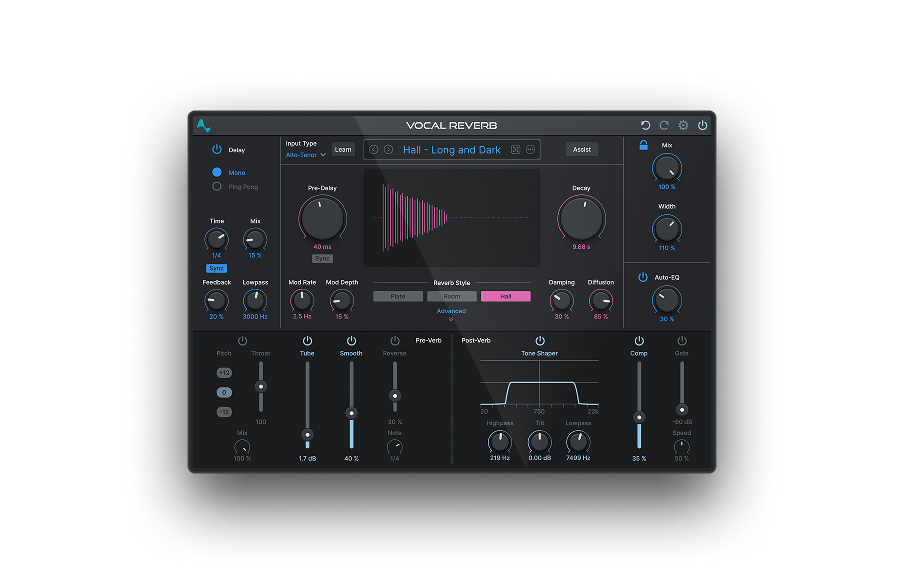
Vocal Reverb is built specifically for the human voice, and that distinction matters. Generic reverb algorithms optimize for instruments across the full frequency spectrum. Vocal Reverb's algorithm focuses on the vocal range, which means less low-end mud, more natural-sounding tails, and AI-assisted settings that adapt to your specific recording rather than requiring manual dial-in from scratch.
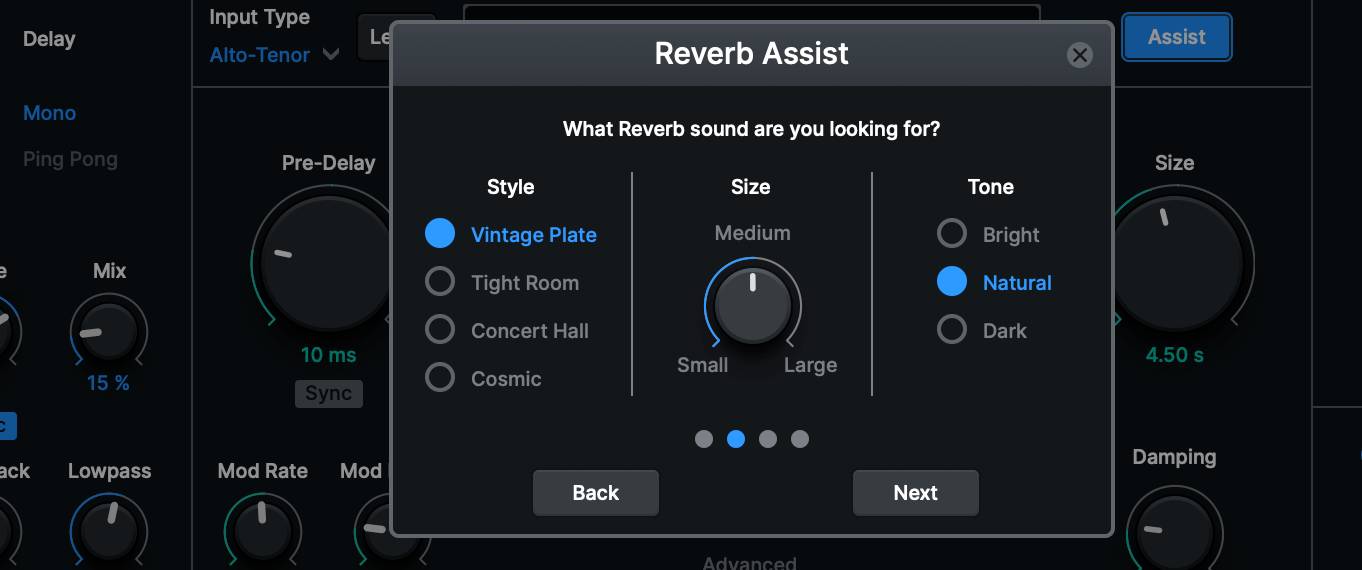
AI Assist is the headline feature, and it works differently from anything else on this list. You tell Vocal Reverb the vibe you're going for, and the AI delivers a uniquely crafted reverb sound built around your input. It walks you through a series of prompts about the style and space you want, then generates a custom setting based on your answers. If you don't like the result, hit the back button on the "We recommend" screen and run through the prompts again with different selections. It's not a preset browser; it's an interactive sound design tool that gives you a tailored starting point for every session.
Auto-EQ is the feature that solves one of the most common reverb problems in vocal production, muddy tails. It uses AutoTune's proprietary pitch tracking technology to monitor the fundamental pitch of your vocal and dynamically attenuate frequencies that cause low-end buildup and overpowering reverb tails. Standard reverbs apply a static EQ curve regardless of what the singer is doing. Auto-EQ tracks the performance in real time. Getting your vocals to sit in a mix without manually automating your reverb EQ has never been faster.
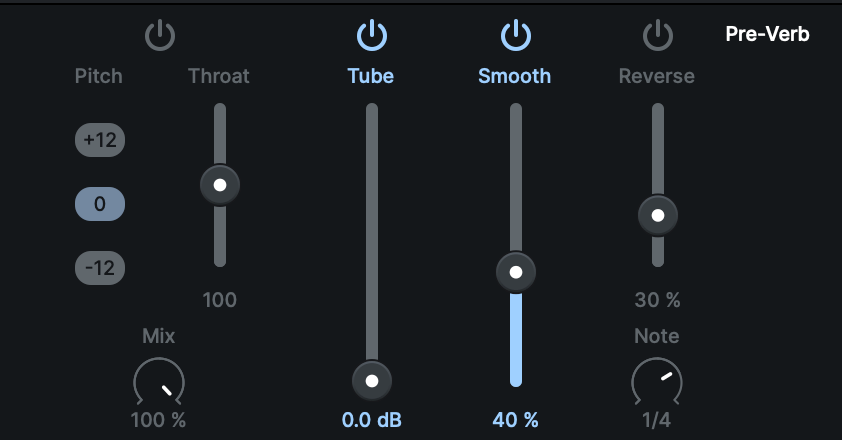
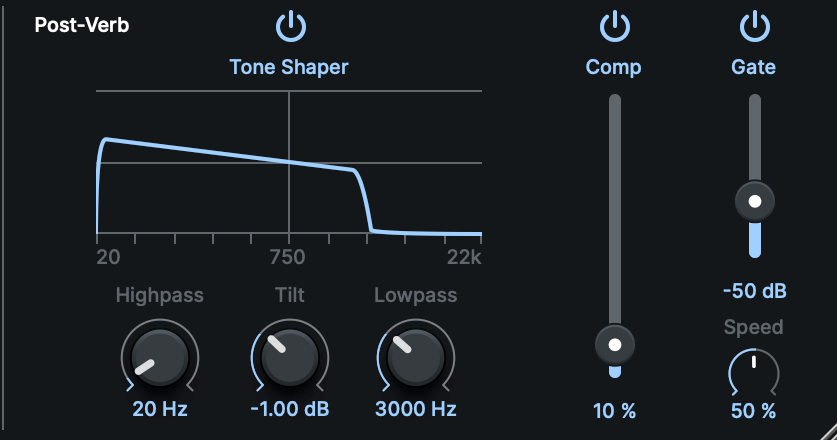
Three classic reverb algorithms (Hall, Plate, and Room) give you the foundation. Hall for dark, moody spaces. Room for tight, intimate settings. Plate for smooth, vintage character. From there, you have ten built-in effects to sculpt the sound before and after the reverb stage. Five Pre-Verb effects (Pitch, Throat, Tube, De-Esser, Reverse) process the signal before it hits the reverb algorithm, letting you shape the source character going in. Five Post-Verb effects (Tone Shaper, Compressor, Gate, Auto-EQ, Width) shape the reverb tail on the way out. No other reverb plugin on this list gives you that level of creative control inside a single window.
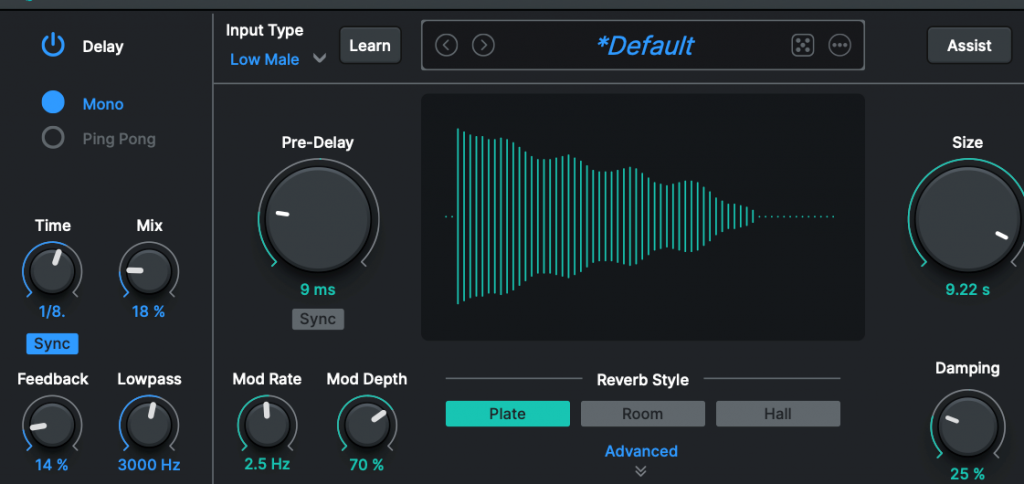
Two delay types (Mono and Stereo Ping Pong) are built in for moments when you want to push your vocals further with delay-based spatial effects, no separate plugin needed. Pre-delay controls let you set the exact gap between the dry vocal and the reverb onset, which is critical for keeping vocals upfront in a dense mix.
Artist presets from Bainz (Young Thug, Gunna, Travis Scott, Future), Dyryk (Kodak Black) and others, span a wide range of vocal styles and vibes. As Bainz says, "I'm having a lot of fun with Vocal Reverb in my mixes. It's great having so much control pre and post-verb, and the AI Assist delivers fast results." Load a preset, tweak to taste, and you're working with settings built by engineers who mix records you've heard on the radio!
Vocal Reverb is included with AutoTune Unlimited, alongside AutoTune 2026, the full AI-Powered Vocal Chain, Harmony Engine, and every other Antares plugin. For producers already working in that ecosystem, it's the obvious first call before reaching for third-party options.
Valhalla Room
Valhalla Room is one of the most widely used reverb plugins in professional production for a reason. It sounds excellent, costs very little, and runs efficiently on any system. The reverb tails are dense and musical without sounding synthetic or smeared.
For vocals, the Room and Chamber modes deliver natural ambience that places a voice in a believable acoustic space. The Size and Decay controls interact musically, and the Early and Late mix lets you dial in exactly how much room character you want without the tail overwhelming the dry signal. At its price point, nothing else comes close.
Valhalla Shimmer
Shimmer belongs in a separate category from standard reverb. It pitch shifts the reverb return, creating an ethereal, crystalline tail that floats above the original signal. On vocals, it adds a cinematic quality that works well on atmospheric pop, alt R&B, and any production where the reverb is meant to be heard, not just felt.
Use it as a send effect at low wet levels rather than an insert, and blend carefully since shimmer effects can overwhelm a mix quickly if you push it.
FabFilter Pro-R 2
Pro-R 2 is the engineer's reverb. The display is immediately readable, the controls are logical, and the sound quality is consistently clean across all reverb types. The Space knob scales every reverb parameter simultaneously from small room to large hall, so you can dial in a basic size decision quickly and fine-tune from there.
The built-in EQ on the reverb return is one of its most useful features for vocals. Rolling off low-end below 200 Hz in the reverb keeps the tail from competing with your kick and bass. A gentle high-shelf cut above 8 to 10 kHz takes the harsh edge off bright room reflections. Just like Vocal Reverb, Pro-R 2 handles this inside the plugin rather than requiring a separate EQ after the reverb, which keeps your signal chain clean.
Soundtoys Little Plate
Little Plate models the EMT 140 steel plate reverb, a hardware unit that appeared on thousands of records in the 1960s and 70s and never stopped being relevant. Plate reverbs have a density and sustain that makes lead vocals feel larger and more present without pushing them back in the mix the way a room or hall can.
Soundtoys keeps things simple. For the most part you’re just adjusting Decay, Mix and the Low Cut, then deciding whether to flip on the Mod switch for a little extra movement and character. On your lead vocals, it gets you to a bright plate sound quick without pushing your vocals too far back in the mix.
Eventide Blackhole
Blackhole started as a hardware reverb algorithm and became a go-to for producers who need reverb that functions as a creative effect rather than a realistic acoustic simulation.
On lead vocals, use Blackhole sparingly, primarily as a parallel effect on individual words or phrases rather than a persistent tail across a whole verse. It destroys intelligibility at high wet levels. At low levels or on specific automation lanes, it adds texture and dimension that no conventional reverb plugin replicates.
Lexicon PCM Native Reverbs
Lexicon's hardware reverb units defined the sound of records from the 1980s through today. The PCM Native plugin bundle brings that character to software, including the iconic PCM 70 plate and the large hall algorithms that appear on countless major label recordings.
The Lexicon sound is warm and slightly colored in a way that works particularly well on traditional pop vocals and anything targeting a classic, high-budget studio aesthetic. The plugin UI is dense and takes some learning. Once you know it, the results speak for themselves.
Waves H-Reverb
H-Reverb is Waves' flagship algorithmic reverb, and it brings one feature that most reverb plugins lack, envelope control over the impulse response. An impulse response is essentially a captured snapshot of how sound behaves in a real acoustic space. H-Reverb lets you shape the attack transient and sustain that captured response independently, which means you can design reverb tails that feel dynamic and responsive rather than static. For hip-hop and R&B vocals with heavy rhythmic delivery, this produces a reverb that moves with the performance instead of sitting passively behind it.
How to Use Reverb Correctly on Vocals
A few principles that consistently produce better results:
Use reverb as a send, not an insert. Route your vocal to an auxiliary channel with the reverb at 100% wet. Blend the send level from your dry track. This gives you precise control over the wet/dry balance and lets you automate the reverb return independently throughout the song.
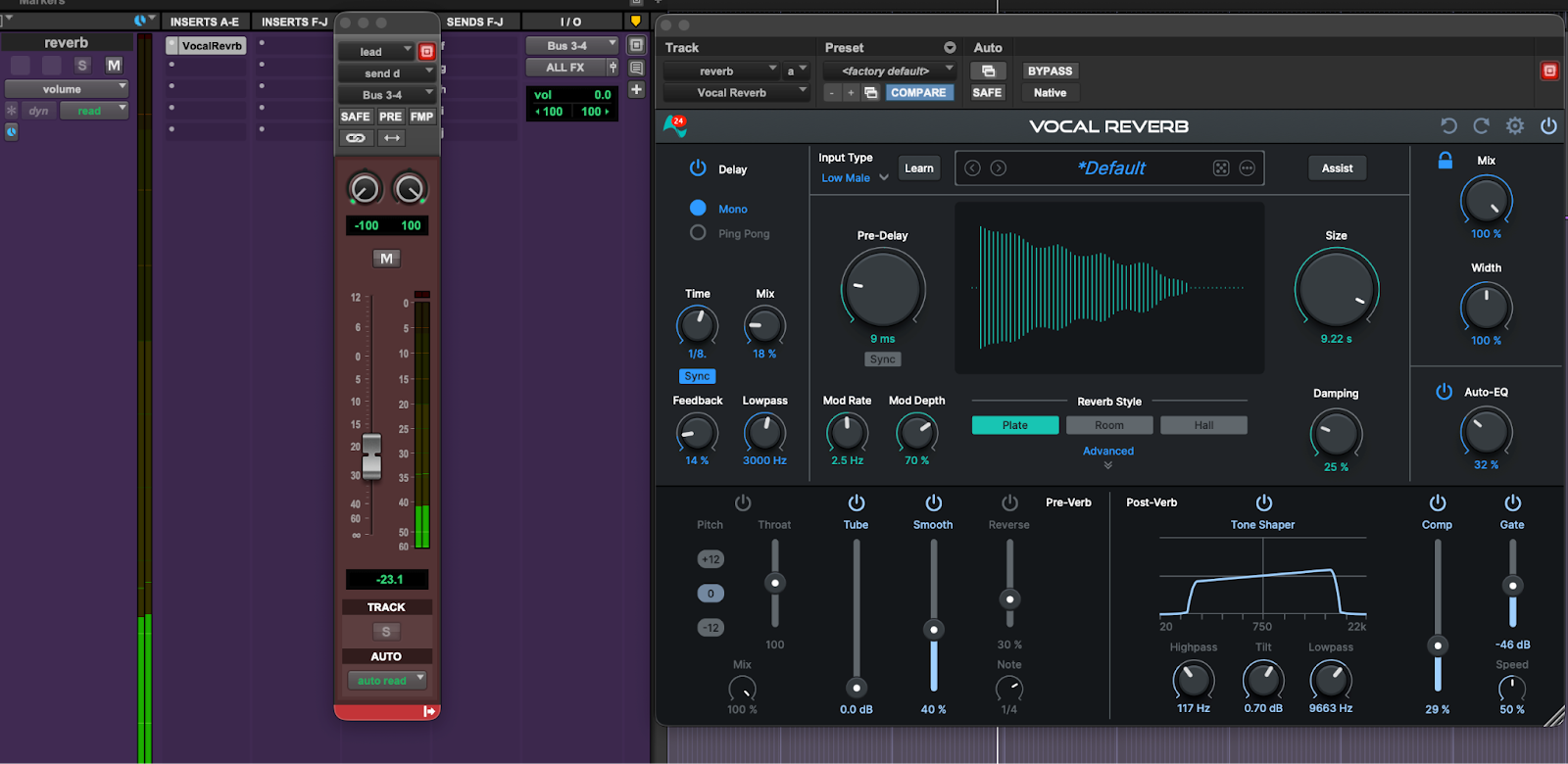
Set pre-delay before you set decay. Pre-delay determines how much the reverb tail separates from the dry signal. Start at 20 ms and adjust based on the tempo and density of the track.
EQ the reverb return. High-pass filter the reverb below 150 to 200 Hz. Low-end buildup in a reverb tail is one of the most common causes of muddy mixes, and it almost never adds anything useful.
Reverb is one piece of the picture. If you're evaluating the full landscape of vocal plugins beyond reverb, The Complete Comparison Guide to the Best Vocal Chain Plugins covers every category side by side. For the full chain context, where reverb sits and what comes before it, How to Build a Professional R&B and Rap Vocal Chain with AutoTune Unlimited walks through the complete signal flow from noise removal to space.
The Cleanest Path to Professional Vocal Reverb
If you're already working with AutoTune Unlimited, Vocal Reverb is your starting point for every vocal session. It's purpose-built for voice, it adapts to your recording, and it's already in your plugin folder.
Reverb doesn't make a bad vocal good. But the right reverb makes a great vocal feel like it exists in its own world.
Vocal Reverb is included with every AutoTune Unlimited subscription, alongside the full AI-Powered Vocal Chain, AutoTune 2026, and 20+ professional vocal plugins. One subscription covers your entire vocal production workflow.

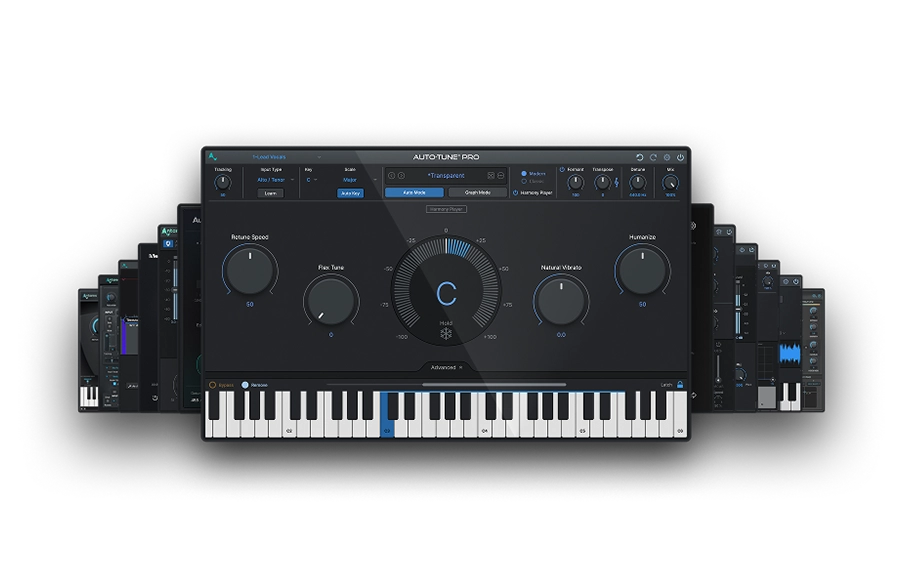
AutoTune Unlimited
The Ultimate Vocal Production Suite
Frequently Asked Questions
What is the best reverb plugin for vocals?
The best reverb plugin for most producers is AutoTune Vocal Reverb. It is specifically designed for the human voice, offering AI assisted settings that adapt to your recording without the muddy tails associated with generic instrument reverbs.
Should you put reverb on a vocal as an insert or a send?
Always use a send. Routing your vocal to an auxiliary channel with the reverb set to 100 percent wet gives you total control over the mix, allowing you to EQ and automate the reverb tail without coloring your dry vocal track. Using a direct insert is counterproductive in a dense mix.
Does reverb go before or after compression in a vocal chain?
Always place reverb after compression. Compression should be applied to your dry signal to control dynamics. If you place compression after the reverb, it will pump the reverb tail and create an unnatural, washy sound that hurts your mix clarity.
How much reverb should you put on a lead vocal?
Use only enough reverb to place the vocal in a realistic space. The goal is a subtle effect you can feel but not consciously identify. If you can clearly hear the reverb tail while the lead vocal is playing, it is likely too much for a professional mix.
What is the difference between algorithmic and convolution reverb?
Algorithmic reverb generates tails mathematically, while convolution reverb uses recorded acoustic samples. Algorithmic reverb, used in AutoTune Vocal Reverb, offers full parameter control for creative flexibility. Convolution reverbs, like Audio Ease Altiverb or the Waves IR series, provide highly realistic room sounds but are less adaptable to creative processing.
What reverb does The Weeknd use?
The Weeknd uses a combination of clean plate reverb and modern pitch effects. This specific approach creates his signature polished, intimate sound. He often utilizes tools like AutoTune Vocal Reverb to integrate space directly into the vocal chain for maximum intelligibility.
What reverb plugin does Drake use?
Drake’s signature vocal sound relies on ultra transparent, high end hardware reverbs similar to the Bricasti M7 or Lexicon 480L. These units provide extremely dense, invisible space that keeps the vocal feeling dry and intimate while avoiding the metallic artifacts of lower quality digital reverbs. You can replicate this professional, upfront sound in your own tracks using AutoTune Vocal Reverb by selecting a small, neutral room algorithm and keeping the wet mix level very low.

Exclusive AutoTune Content

Vocal Reverb

AutoTune Unlimited

AutoTune 2026 and Metamorph
Now Included

Antares Editorial
Antares is a leading developer of software for music recording and live performance. For over 20 years, Antares has powered the music of top-charting and indie artists with products including the industry standard for pitch correction, AutoTune™.