
Working with audio means understanding the tools required to get the job done, but also the process that sound goes through and all the technical jargon that producers and audio engineers use daily, which can be very intimidating when you've just started.
One of the most confusing terms in music production is "dither.” Still, once you get the idea of what it is, you'll realize it's an essential tool to use in production.
So, what is dithering? How does it work? And when should it be used? We'll answer these and other questions in this blog post.
What is Audio Dithering?
Dithering is an effect that adds noise to a digital audio signal to mitigate the distortion generated when reducing its bit depth. (This is also called quantization distortion.) For example, dithering is essential when you need to downsample your audio file to 16-bit to release your music on CD or distribute it on streaming platforms.
Dithering should only be used during the mastering phase, which is the last step in the post-production process.
This brief definition may raise more questions than answers, so let's go step by step on how audio recording is done to understand all about sample rates, bit depth, and why you would want to add more noise to your audio recordings.
What is Quantization?
To get deeper into dithering, you need to understand quantization. Let's start by explaining how an analog audio signal is recorded and transformed into a digital audio signal via an analog-to-digital converter (ADC). For the ADC to capture the analog signal, it requires taking samples of the waveform to recreate it within your digital audio workstation (DAW).
In this process, two factors are crucial: sample rate and bit depth. A sample rate is the amount of samples (think of them as snapshots) per second your audio interface takes of the analog waveform. The size of each sample is referred to as bit depth and determines how much information from the sample is recorded.
Quantization occurs during the sampling process when the amplitude of the sample is rounded up or down to the nearest digital value. Recording with higher bit depth will provide more information to recreate its amplitude and capture a more dynamic range. In contrast, a higher sample rate will more accurately recreate the frequency range. As a result, your audio recording will have better resolution.
The Nyquist Theorem states that we need a sampling rate twice the audio signal's highest frequency. Since humans can only hear frequencies within 20 and 20 kHz, audio engineers' lowest sample rate for recording music is 44.1 kHz.
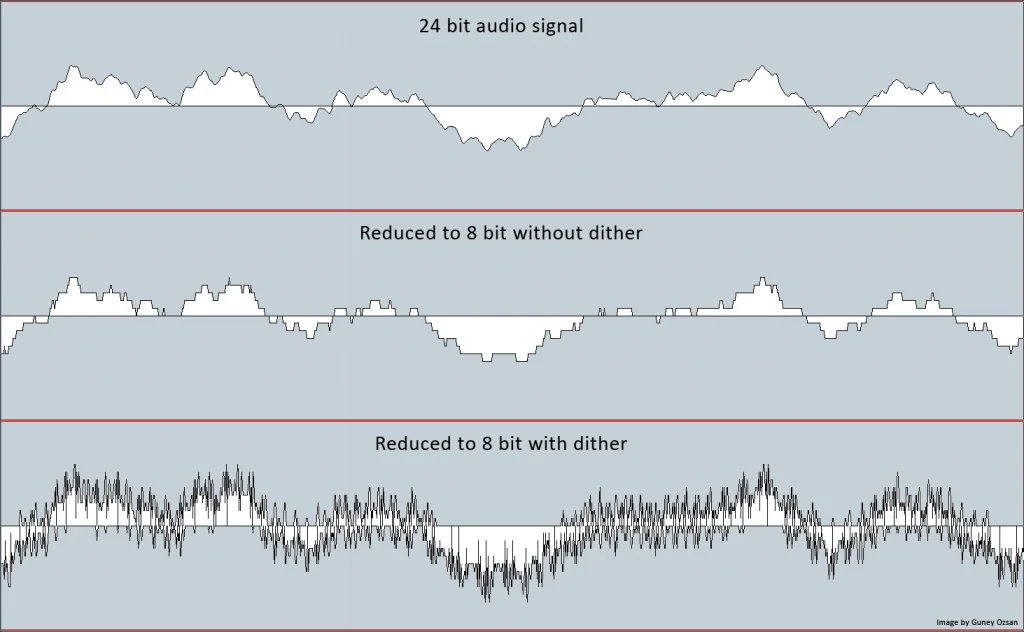
When you reduce the bit depth, you're also downscaling the amplitude values to recreate the original sample, so the dynamic range of your digital audio is less accurate than the original; this is also called "truncation." All the information loss due to truncation causes a quantizing error that adds distortion. This noise in your audio file is audible during quiet parts and fade-outs.
How Does Dithering Work?
The way dithering helps fight quantizing distortion may seem strange. It trades distortion noise in favor of other low noise.
Using dithering during the mastering process will help you hide the distortion noise by randomizing the process of rounding up or down the amplitude's value during bit depth reduction. Dithering prevents truncation and minimizes quantizing error by replacing quantizing distortion with low-level noise that is more pleasant to your ears, thus improving the quality of your audio track.
This noise added by dithering fills the information loss during bit depth reduction, helping the truncation in the waveform become less square-shaped.
Because it adds distortion, it is essential to dither at the end of the production process to avoid adding unnecessary noise. However, there are also many ways to use distortion creatively during the mixing process: check out the 6 Creative Ways to Use Distortion if you want to find out more.
To summarize, dithering does not eliminate quantizing distortion but makes it less perceptive to your ears by adding noise.
How To Dither Vocals?
You have the option of processing vocals separately during the mastering stage. You can use resonance and sibilance reduction, followed by EQ and output limits, to process vocals independently.
You can use an inflator plug-in to boost the gain and lower the input level if you want your vocals to stand out in your mix. Without significantly changing the audio signal, it will saturate the voice and bring up minor nuances, making it sound brighter and full of details.
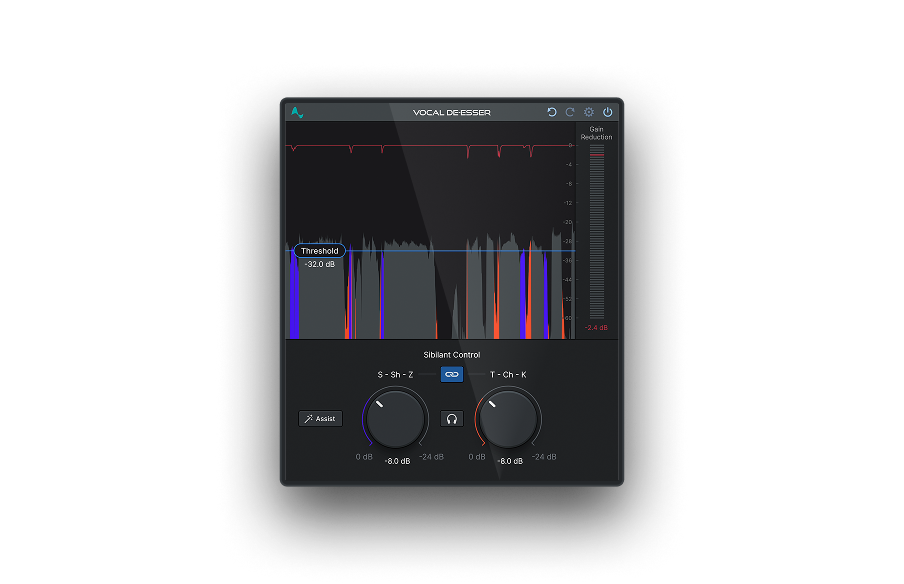
Sibilance reduction comes next. You can use a specialized plug-in for de-essing vocal tracks like Vocal De-Esser. Vocal De-Esser has been trained on the unique characteristics of the human voice to control sibilant sounds without compromising the performance or tone of your vocal tracks.
Once you complete the vocal processing, you can proceed with the mastering process, using limiters and a maximizer to make the track louder without dramatically altering the peaks.
Different Types of Dithering
Remember, dithering adds noise to cover up truncation noise, but it's also possible to hide dither noise with a noise-shaping tool. What noise-shaping does is similar to adding EQ to your track- it alters frequencies of the low noise to make it less audible.
DAWs come equipped with dithering plug-ins to master your tracks with different types of dithering. Noise-shaping plug-ins utilize algorithms known as Psychoacoustically Optimized Wordlength Reduction (POW-r). Sometimes you can see them listed as POW-r types or as None, Moderate, and Ultra, ranging from no frequency manipulation to heavy frequencies manipulation.
In Logic Pro, you can find three types of POW-r dithering that can be helpful depending on the music genre you're producing:
- POW-r Type 1 is recommended for loud mixes and low dynamic range. It works more like colored dithering and not as noise-shaping.
- POW-r Type 2 is beneficial for speech recordings because it uses noise-shaping to cut down around 2 kHz and raise frequencies above 14 kHz.
- POW-r Type 3 will help you with high-dynamic mixes. The noise-shaping feature is more aggressive than the POW-r Type 2 to minimize the quantization distortion to its limit.
Many producers recommend bouncing your mix with the different dithering types to listen and choose the one that sounds best. You can barely hear a difference unless there's a significant bit depth reduction, like going from 24-bit to 8-bit. But at the same time, ear-trained producers claim they can hear minimal differences in quieter sections when listening with good audio monitors or headphones.
Vocal De-Esser
AI-Powered Sibilance Control
When To Use Dithering?
Dithering must only be used when strictly needed, like when downsampling from 32-bit fixed point to 24-bit or from 24-bit to 16-bit and lower during the mastering process. Avoid dithering while mixing, or it will add noise later in the mastering process if the audio engineer applies a second dithering plug-in. That's why it's more common to use dithering among home studio producers who also master their tracks.
One of the last steps in the mastering process is using a limiter. You'll notice that many limiters include dithering features to apply to the mastering chain.
When Not To Use Dithering?
Here are some scenarios where dithering is unnecessary and could affect the quality of your tracks instead of improving them:
- Using dithering in your mix to add noise. If you need to reduce the bit depth later, you'll be adding noise to your track twice.
- If you are sending your track for mastering to someone else.
- When bouncing from 32-bit float to 24-bit, you do not need to use dither because the bit depth is the same.
- If you are exporting to compress audio formats such as MP3 or AAC because this compression will add more noise.
Does Dithering Make A Difference In Music Production?
Dithering will help you achieve the best results when working with high dynamic range recordings such as orchestral and filming scores projects. In these productions, dither reduces quantizing distortion while keeping the quality of the sample.
For some low-dynamic projects such as rock or pop music, dithering may be hard to perceive unless going to an ultra-low bit depth. But you should always listen to your audio on different playback systems before deciding if dithering is necessary.
Final Thoughts
Once you understand how bit depth works and how it affects your audio quality when you need to reduce it, it's simple to comprehend the science behind dithering.
The music industry is changing, and maybe the standard resolution will change one day to adjust to higher resolutions, and the need to reduce bit depth and dithering will be a thing of the past. But for now, it's helpful to know how to make the most of this tool and how it can improve your recordings.

Exclusive AutoTune Content
Vocal De-Esser

AutoTune Unlimited

AutoTune 2026 and Metamorph
Now Included

Antares Editorial
Antares is a leading developer of software for music recording and live performance. For over 20 years, Antares has powered the music of top-charting and indie artists with products including the industry standard for pitch correction, AutoTune™.