

Live vocal performance is built on five moving parts that separate a great show from a forgettable one.
- Warm up like you mean it. Treat your voice like the muscle group it is and put it through 15 to 20 minutes of progressive activation before you ever touch a mic.
- Fix your monitoring before anything else. A clear in-ear mix is the difference between singing in tune and pushing flat all night.
- Work the mic. Distance, angle, and grip control your tone, dynamics, and feedback rejection more than any plugin downstream.
- Arrange your set around peak moments. A planned vocal arc lands harder than ten back-to-back full-power songs every single time.
- Bring your own vocal chain. Run AutoTune 2026 and a polished signal path on stage, so your live tone matches the record listeners already know.
Vocal Warm-Up Routine for Live Performance (15–20 Minutes)
Running through your opener at full belt is not a warm-up, it is an audition for laryngitis. Your voice is a muscle group that needs 15 to 20 minutes of progressive activation before showtime. Start with low humming lip trills to move blood into the cords without impact, then climb into sirens through your passaggio until the break between chest and head voice smooths out. Finish with staccato "huh" exercises on medium vowels to wake up the diaphragm. For a full pre-show routine with the exact order and duration, run through our breakdown of the 12 best vocal warm-up exercises for singers.
Do a light jog or 20 push-ups somewhere in there too because cardio opens the ribcage and gets breath support firing so the first chorus does not feel like you just climbed four flights of stairs.
Fix Your Monitoring Before You Fix Anything Else
If you cannot hear yourself, you cannot sing in tune, and nothing else on this list matters until that is solved. Wedges push stage volume up and invite feedback. In-ear monitors (IEMs) give you a sealed, consistent mix that travels with you regardless of venue size or PA quirks.
Ask your engineer for your vocal 3 to 6 dB louder than the instruments in your IEM mix. Add a touch of reverb on your vocal channel in the monitor feed, around a 1.2-second plate at a low send level, so your ear hears space instead of a dry, exposed signal. A dry monitor mix is the reason singers push flat: the brain hears no ambience and compensates by oversinging.
Learn to Work the Mic: Distance, Angle, and Feedback
A Shure SM58 is built to take a beating, and it will punish you for lazy technique. Hold the mic 2 inches from your mouth on sustained notes and pull it out to 6 or 8 inches when you belt the hook. That distance move is free compression. It is the same trick Mariah Carey, Whitney Houston, and every working gospel singer has built a career on.
Cup the head of the mic, and you kill the polar pattern that rejects feedback in the first place, which is why every cupped vocal at an open mic sounds like a muddy voicemail. If you want proximity warmth, move closer. Condenser mics like the Sennheiser e 965 reward precise technique with studio-grade clarity and punish plosives, so angle the capsule slightly off-axis from your mouth.
Arrange Your Set Around Peak Moments
A great setlist flows in an arc, not a straight line of ten full-power songs. Open in the middle of your range so you have room to grow. Save your highest, most exposed notes for the third or fourth song, once your voice has fully opened up. Plan a ballad in the back half to drop the energy and reset the audience's ears before the closer.
Inside each song, map your peaks. Mark the lyric sheet with circles around big breath points, arrows at crescendos, and stars on the money notes. This is the same vocal arranging process producers like Greg Wells run in the studio, and it works on a stage for the same reason, a planned peak lands harder than a hoped-for one every single time.
Lock In Your Live Vocal Chain
Studio vocals get five plugins and a mastering engineer. Live vocals get you, a mic and whatever signal path the FOH engineer hands you. Build your own chain and bring it with you. For a festival-scale walkthrough of the full rig, see our guide on how to build a live vocal chain for festival-level production.
Run your mic into an audio interface into a laptop running Ableton Live, Logic Pro or MainStage. Load AutoTune 2026 as the first insert on your vocal track. Set Key and Scale to match the song. For transparent live correction that catches pitch without announcing itself, set Retune Speed to 25 ms, engage Flex Tune and leave Humanize around 25. For the hard-tuned T-Pain sound, drop Retune Speed to 0 ms, bypass Flex Tune and let every note snap to grid. For a deeper breakdown of the settings touring artists use on stage, read our guide to real-time pitch correction for live performance with AutoTune 2026.
Follow that with the AI-Powered Vocal Chain. Hit the Learn function on Vocal EQ to set a curve for your specific voice, run AI Assist on Vocal Compressor to catch the dynamic swings from mic-distance changes, and add Vocal Reverb on a short plate for natural space. Keep total round-trip latency under 10 ms. Anything higher and you will feel like you are singing through a tin can at a house party. If you are not sure how to get there, our primer on low latency monitoring in DAWs covers buffer size, interface settings, and driver fixes.
Hydrate, Rest, Recover
Drink 64 ounces of room-temperature water per day for the three days leading up to a show. Cold water constricts the cords and hot tea dries them out, which leaves room temperature as the sweet spot touring vocal coaches like Ron Anderson have preached for decades.
Skip the pre-show whiskey, skip the dairy, and sleep seven hours. Your voice heals overnight, and a rested voice running at 80 percent of peak will outperform a tired voice running at 100 percent of peak every single time.
Ready to bring your studio vocal rig to the stage? Get AutoTune Unlimited and run the same tools playing Coachella mainstages through your own laptop tonight.

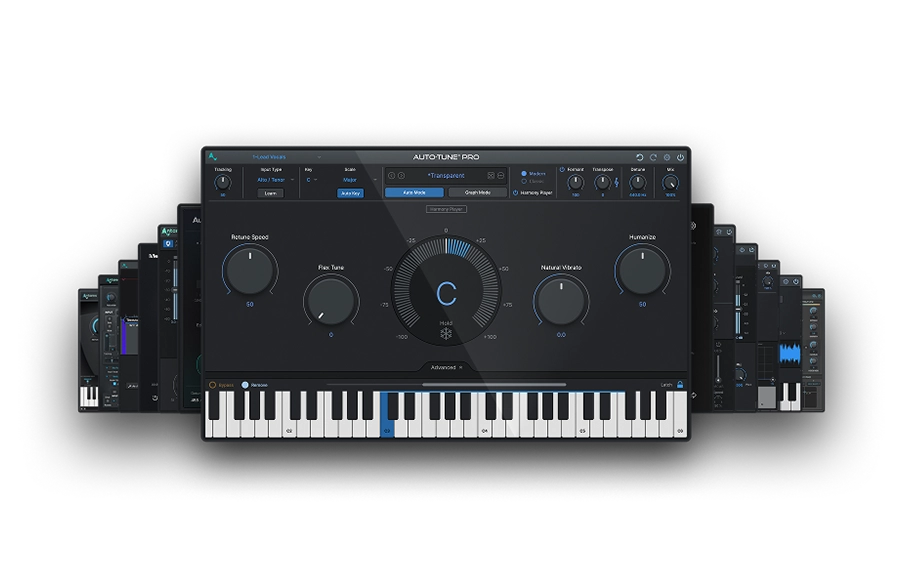
AutoTune Unlimited
The Ultimate Vocal Production Suite
Frequently Asked Questions
How long should a live vocal warm-up be?
Aim for 15 to 20 minutes of progressive work: lip trills, sirens through your break, light staccato exercises, and a short burst of cardio.
Are in-ear monitors better than wedges for live vocals?
Yes. IEMs deliver a sealed, consistent mix at every venue and lower the stage volume, which protects your hearing and your pitch.
How do you protect your voice when performing live?
Drink 64 ounces of room-temperature water per day for the three days before a show, skip dairy and alcohol pre-show, sleep seven hours, and run a 15 to 20 minute warm-up before you hit the stage.
Can I use AutoTune live on stage?
Yes. Load AutoTune 2026 as the first insert on your vocal track in Ableton Live, Logic Pro, MainStage or whatever DAW you prefer and route your mic through an audio interface. Set Retune Speed to 25 ms for transparent live correction, or drop it to 0 ms for the hard-tuned effect. Keep round-trip latency under 10 ms so the vocal stays locked to the band.
What is the best microphone for live vocals?
The Shure SM58 is the touring standard for its durability and feedback rejection. For a condenser upgrade with studio-grade clarity, the Sennheiser e-965 is the pro move.
Why does my voice sound worse live than on the record?
Usually it is monitoring, not talent. A dry or quiet monitor mix makes singers push flat and shout. Fix the IEM mix first, and the record-to-stage gap shrinks fast.

Exclusive AutoTune Content

AutoTune Pro


AutoTune Unlimited

AutoTune 2026 and Metamorph
Now Included

Antares Editorial
Antares is a leading developer of software for music recording and live performance. For over 20 years, Antares has powered the music of top-charting and indie artists with products including the industry standard for pitch correction, AutoTune™.