

Are you struggling to get your vocals polished? You're not alone! Luckily, there are different ways to take your songs to the next level in no time. Whether you're a seasoned producer or just starting out, these tools will help you achieve a more professional sound with your vocal recordings.
Equalization (EQ)
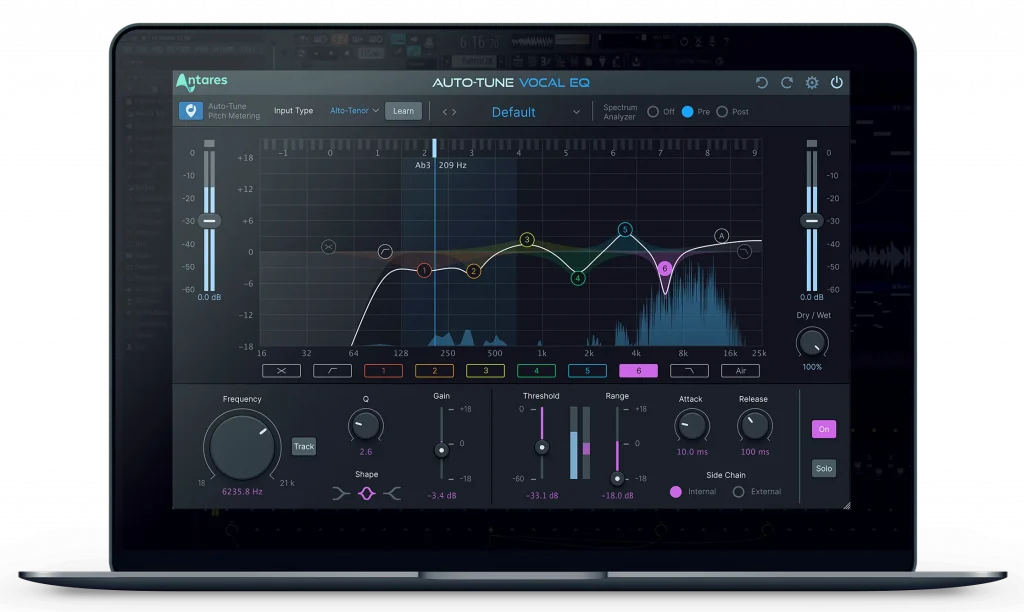
EQ is one of the most essential and versatile tools in a producer's arsenal, as it allows you to adjust the frequencies in a recording and shape the sound to create a coherent and pleasant soundscape.
When using EQ on vocals, your main focus is to obtain optimal clarity without sacrificing the intrinsic characteristics of the track. You do so by enhancing and mitigating specific frequencies, ensuring the final vocal track seamlessly blends with the rest of the song.
Such a delicate process requires professional tools to get the perfect results. Here at Antares, we developed the iconic Auto-Tune Vocal EQ, a versatile and intuitive EQ to smoothen and magnify your vocals' frequencies. Chosen by producers and audio professionals globally, Auto-Tune Vocal EQ is the ultimate effect to bring to life the essence of your vocal performances.
Compression
Compression is an invaluable tool for adjusting the dynamic range of a recording, allowing you to bring out subtleties and details within the audio which would otherwise be lost. It works by decreasing the difference between the loudest and quietest parts of the recording, creating more balance throughout. This is particularly useful when working with vocals as it helps create a warmer, more natural sound without compromising clarity.
Compression also allows you to experiment with different effects - for instance, applying gentle compression can add depth and richness to your vocal track, whereas using more aggressive settings can give it an upfront presence in your mix.
No matter what type of sound you're going for, compression can be used to find just the right level of dynamics and enhance your musical production.
Pay attention to the attack and release settings, as these can significantly impact the sound's overall character. A fast attack time, for example, can help to tame sharp transients and bring the vocal sound more under control. In contrast, a slower release time can help preserve the sound's natural decay.
If you're looking for an effect that'll add impact and energy to your recordings, try our Punch vocal enhancer, a powerful mix of compression, gain, and limiting that'll enrich your voice and give an edge to your tunes.
Pitch Correction
Pitch correction helps you correct any notes that are out of tune, but can also be used creatively to craft your own unique vocal signature. Check out this post on the main differences between Auto-Tune and Pitch Correction to learn more.
Whether you want to adjust your pitch or add effects to your vocal recordings to make them sound unique, there are over 100 effect patches included in Auto-Tune EFX+ to satisfy your needs and upgrade your sound.
With its multi-effect rack, real-time processing, and the Pitch Shifting Melodic Pattern Generator, you can unleash your creativity and meet industry standards with professional-sounding vocals.

Reverb
Using reverb on vocals can create a sense of space and ambiance, giving the impression that the sound is coming from a larger environment. It can also be used to blend vocals with other instruments to create a more cohesive overall soundscape.
We discussed in detail the importance of reverb in this article, so check it out if you want to learn more about this fundamental audio effect for vocals.
Delay
Delay is an echo effect that repeats the original vocal signal at a specified interval. Using delay on vocals can create a broad range of exciting effects; experiment with all of them, like tape delay, digital delay, or modulated delay.
Remember to adjust the delay time and feedback levels carefully, A variety of other parameters in a delay can also help create depth, texture, and movement without overpowering the rest of the mix.


AutoTune Unlimited
The Ultimate Vocal Production Suite
Echo
Echo, also known as tape delay, is a specific type of delay effect that can add space, depth, and atmosphere to a track. It creates a repeating series of delayed signals that give the impression of an echo or reverberation in a room.
Using echo in your vocal processing can help to create vocal harmonies and counterpoint. Whether you want to add subtle ambiance or create a dramatic and dynamic effect, echo is a powerful tool that enables you to achieve the perfect vocal sound.
Chorus
A chorus is a modulation effect that duplicates the original vocal signal and adds slight variations in pitch and timing to create a more dense sound.
Chorus is crucial when you want to create an immersive soundscape and is the best effect to magnify the qualities of vocals. If you want to turn a single vocal recording into a powerful chorus, try Choir by Antares, the secret weapon of thousands of producers worldwide, to create a deep and diverse group of voices.

Saturation
Saturation involves adding harmonic distortion to the original vocal signal, which can help to create a more natural, organic, and vintage sound. When you apply subtle saturation to your vocals, you'll add warmth and richness to their sound, making it stand out in the mix and giving it a more natural feel.
Many types of saturation effects are available, ranging from analog-style tape saturation to digital distortion and everything in between. Each kind of saturation effect has its unique characteristics, which can be used to create a range of exciting and creative vocal sounds.
Warm is an excellent tool to bring vocal tracks to life, with a carefully-crafted blend of analog tube saturation that enhances the qualities of a voice. Other valid options include Soundtoys Decapitator, FabFilter Saturn, and UAD Studer A800.
De-Essing
De-essers reduce the harsh, hissing "s" and "sh" sounds present in vocal recordings.
This effect involves using a specialized plug-in to identify and reduce those specific frequencies. De-essing is achieved by applying a bandpass filter to the vocal signal, which allows only the problematic frequencies to be mitigated by the effect. The de-esser then uses a combination of compression and EQ to reduce the level of these frequencies, resulting in a smoother and more natural-sounding vocal performance.
A great de-essing tool can affect sibilance while leaving the rest of the performance untouched. Vocal De-Esser is a popular choice among producers because its side-chain compression can effectively remove sibilance without over-compressing vocals, resulting in a natural and polished vocal recording.
Given the importance of the topic, we dedicated a post to the process of de-essing vocals in a mix.
Distortion
Distortion is an effect that can add grit, character, and attitude to vocals, resulting in a unique and edgy sound. You achieve this by intentionally overdriving the input signal, creating harmonic overtones, and adding harmonics that weren't present in the original sound.
This effect is often used in rock, metal, and punk genres, where a raw and unpolished sound is a trademark. However, distortion can be used creatively in all genres to add excitement and edge to a vocal track.
AutoTune Unlimited
The Ultimate Vocal Production Suite
Stereo Width
Stereo width can transform a flat, narrow vocal sound into an immersive experience. It manipulates the stereo field of your vocal track, spreading the sound across the left and right channels to create a sense of width and space.
With stereo width, you can get the listener to perceive each track element more clearly. You can also use it to create a sense of movement by panning the vocals from side to side to engage with the listener. Check out ‘Choir Stereo Spread’ in the automatic vocal harmony generator, Harmony Engine, if you want to experiment with stereo width.
Pitch Shifting
Pitch shifting creates interesting vocal harmonies or adds depth and texture to a vocal track. With pitch shifting, you can transpose a vocal recording up or down by several semitones, giving you the flexibility to create unique and unexpected sounds.
Throat, by Antares, is the ultimate solution for the producer or singer who wants complete control over a vocal track's anatomy. With Throat, you can make subtle changes to lips, mouth, throat, and vocal cords to change the structure of a voice and enhance its characteristics.
Limiter
A limiter acts as a safety net, catching any peaks or loud moments in the vocal track and reducing their volume to keep them in check. It works by setting a maximum level for the vocal, preventing it from getting too loud and causing distortion in the mix.
One of the benefits of using a limiter is that it allows you to increase the overall volume of the vocal track without sacrificing clarity. Find out more about this crucial tool in our post dedicated to limiters.
Multi-Function Vocal Processing Toolkit
Do you want to take your vocal processing to the next level? With Auto-Tune Unlimited's affordable monthly subscription at $24.99/month, you'll get unlimited access to our entire collection of plug-ins, giving you every professional tool you'll ever need to stay ahead of the curve, and magnify the quality of your vocal tracks.
Good luck, and stay creative!
AutoTune Unlimited
The Ultimate Vocal Production Suite

Exclusive AutoTune Content

Vocal EQ



AutoTune Unlimited

AutoTune 2026 and Metamorph
Now Included

Antares Editorial
Antares is a leading developer of software for music recording and live performance. For over 20 years, Antares has powered the music of top-charting and indie artists with products including the industry standard for pitch correction, AutoTune™.