

EQ (or 'Equalization') is the Swiss Army Knife of vocal effects. As a corrective tool, EQ can remove unwanted resonances or mitigate the harshness within specific frequency ranges. It is also an enhancement tool, used to bring out the best qualities of a vocal performance.
Regardless of how you want to use equalization, getting a grip on how to make the most of this powerful tool is crucial if you want to release polished and professional tracks. So let's look at what EQ is and how it can upgrade your vocals.
What is Vocal EQ?
Essentially, a vocal EQ is a tool to adjust the frequency response of a vocal recording. You can boost certain frequencies and characteristics or add warmth to the voice by cutting frequencies that cause unwanted resonance. Or, you can adjust the overall balance of a vocal track to fit better into a mix.
Purpose of EQ in Music Mixing
The purpose of applying an EQ to your vocals is to shape its tonal balance and make it blend seamlessly with the rest of your mix. For example, if your vocal track sounds too boomy, you can cut some low frequencies to remove the unwanted resonance. On the other hand, if the vocal lacks energy, you can amplify the higher frequencies to add some brightness and clarity.
What is a Good EQ Setting for Vocals?
There is no one-size-fits-all solution when it comes to vocal EQ settings, as it depends on various factors such as the singer's style and natural timbre. However, here are some basics to help you get started.
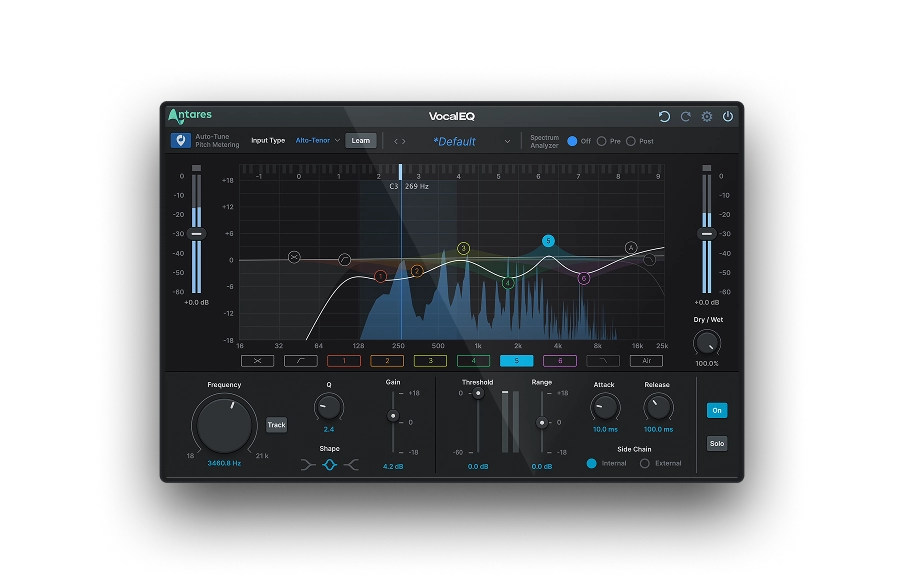
The main parameters of EQ include:
- Frequency: This determines which frequency range to adjust. For instance, boosting the midrange frequencies around 2kHz will give you fuller and richer vocals.
- Q: This controls the width of the frequency band being affected. A narrow Q setting will only affect a specific frequency. In contrast, a wider Q setting will involve a broader range of frequencies.
- Gain: This controls the boost or cuts applied to the selected frequency range.
- Filter Type: This determines the shape of the EQ curve. The most common types of EQ filters are high-pass filters, low-pass filters, band-pass filters, and notch filters.
- Filter Slope: This determines how quickly the EQ curve rolls off beyond the selected frequency range.
These parameters are the same for vocals as for any other musical instrument. You need to experiment and train your ears to find the optimal EQ settings that bring out the best qualities of the vocal performance.
Our recommendation is to start by applying a high-pass filter to remove low-end rumble, then cut any harsh frequencies in the upper or mid-range, and boost frequencies that'll bring out the warmth and clarity of the vocal.
Best EQ Techniques for Vocals
The best EQ techniques for vocals involve a combination of corrective and enhancing settings to balance the tonal qualities. Let's analyse the most common practices one by one:
Cut Unwanted EQ Elements
Identify and remove specific frequencies that are unnecessary or detrimental to the overall sound of your recordings. To do this, start by soloing the vocal track and listening carefully to the tonal qualities of the track. Use a narrow Q setting to pinpoint specific frequency ranges that sound unbalanced. Then, apply a moderate cut to remove the unwanted frequencies.
For example, if you hear a low-midrange build-up that causes your vocals to sound boxy, one of the options is to use a bell filter with a narrow Q setting to cut around 300-500kHz. Similarly, if you notice sibilants in the upper midrange frequencies around 2-5kHz, apply a gentle cut with a bell filter.
Boost the Pleasing EQ Elements
By enhancing the pleasing elements of our track with an EQ, you craft a more vibrant and expressive sound. First, identify the specific frequency ranges that bring out the best qualities of the vocals and then apply a moderate boost to those frequencies.
In most cases, your objective is to bring life to a track that sounds genuine and in line with the industry standards, which requires pristine sound throughout the sonic spectrum. The only way to achieve this is by magnifying the crucial traits of a performance while removing or mitigating everything else so that frequencies of different tracks won't clash. It's a meticulous yet highly rewarding process.

EQ the Leading Vocal vs. Background Vocals
Most songs have a main vocal line known as the "top line" and background vocals that provide support and texture. When EQing the lead vocal, the goal is to make it stand out in the mix by boosting specific frequency ranges that accentuate the vocal's natural tone and character, such as the upper midrange frequencies around 2-5kHz.
However the goal of the background vocal is to complement the leading vocal without overpowering it. Use a high-pass filter to remove any low frequencies that would clash with the bass and kick drum, as well as cutting frequencies that interfere with the clarity of the leading vocal.
Depending on the style of the song, you can also boost certain frequency ranges that add depth and space to the background vocals, such as the upper harmonics around 5-10kHz.
EQing the lead and background vocals independently will create a more balanced and polished sound in your mix.

Vocal EQ
Clarity Above All
Create Room in the Mix
Carefully analyzing which frequencies you want to keep in and remove from your mix will improve your workflow and clarify the steps required to achieve optimal results. When creating room for your vocals in the mix, first ensure you identify all possible conflicting frequencies and adjust them to create tonal balance.
Start by using a high-pass filter to remove low frequencies that aren't crucial. Next, use a low-pass filter to roll off any high frequencies that might add sibilance to the vocal.
Once you've created some space for the vocal in the frequency spectrum, you can use EQ to enhance the vocal's natural tone and character.
Lower Resonances
Resonance can often create a harsh or boomy sound that compromises the clarity and balance of the mix.
To lower resonances in a vocal recording, identify any frequencies causing issues, then use a notch filter to cut them out of the mix. This involves setting a narrow Q and moderate gain reduction at the resonant frequency. Adjust the frequency and gain settings until you've successfully removed the unwanted resonance from the mix.
Use a De-esser to Reduce Sibilance
Vocal De-Esser: The essential plug-in for de-essing your vocal tracks.
Sibilance is the hissing or sharp "s" sounds commonly found in raw vocal recordings. By using a de-esser, you can reduce these unwanted sounds while still preserving the overall clarity of the performance.
To use a de-esser, you'll need to set it up to detect and reduce the sibilant frequencies in the recording. Use a high-pass filter to isolate the sibilant frequencies and then apply a dynamic EQ to reduce the gain of those frequencies when they exceed a certain threshold.
Vocal EQ Settings Chart
While every vocal performance is unique and requires personalised EQ settings, here's a general guideline when EQing vocals in a mix.
In professional albums, vocals don't usually feature a lot of low-frequency sounds, as they're often removed to make space for other instruments like the bass guitar and kick drum.
The 100Hz-300Hz frequency range contains the main elements of a voice. However, these frequencies can get crowded with other instruments like drums and guitars.
To fix this, engineers often remove some of the low-frequency sounds from the vocals, which can make them sound less energetic. The only way to find the perfect balance is to experiment until you find your sweet spot.
The 350Hz-600Hz range gives the voice a full sound. If you're working on background vocals, remove some of these frequencies to place them further back in the mix.
The sound within the 1kHz-4kHz range is sharp and often features nasal sounds. It can be harsh and unpleasant if you have many vocal layers. So, keep an eye on this audio range, and don't be afraid to cut away frequencies.
The 5kHz-8kHz range is where you can make vocals sound bright and shiny. Although the 10kHz-20kHz range is also a great spot to add brightness to the vocals, many producers prefer to cut this range to make room for other instruments like cymbals or synths.
If you compare today's music with hits from the past, you'll notice that modern music sounds a lot brighter, and that's because producers are pushing this range more than ever before.
And that's it! This is all you need to know to start your EQing journey. Hope you find it helpful, and good luck!
Vocal EQ
Clarity Above All

Exclusive AutoTune Content

Vocal EQ



AutoTune Unlimited

AutoTune 2026 and Metamorph
Now Included

Antares Editorial
Antares is a leading developer of software for music recording and live performance. For over 20 years, Antares has powered the music of top-charting and indie artists with products including the industry standard for pitch correction, AutoTune™.