

What is a Vocoder?
A vocoder, short for "voice encoder," is an electronic device or software plug-in used to manipulate an input signal. Initially developed for telecommunications, vocoders have since become a captivating effect. These days, they’re widely used in music production to craft robotic and otherworldly voices.
How Does a Vocoder Work?
A vocoder starts by analyzing the spectral content of an input sound, referred to as the modulator. Then, it uses this information to shape another sound, known as the carrier.
Let’s break down the process.
First, the modulator, usually a voice, is passed through a series of bandpass filters, each designed to let through only a narrow frequency band. This process splits the voice into different frequency bands, ranging from low to high. Then, each band has an associated envelope that tracks the signal's amplitude (or volume) within that band. This creates the "shape" of the original sound.
The carrier signal, which can be any sound (like a synthesized tone or a musical instrument), is also passed through a similar set of bandpass filters. The carrier signal amplitude in each band is then controlled by the envelope taken from the modulator. So, if a particular frequency band in the voice (modulator) is loud, the same frequency band in the carrier will also be loud.
Finally, all these bands' outputs are combined to produce the vocoded sound. This gives the iconic robotic or synthesized voice effect.

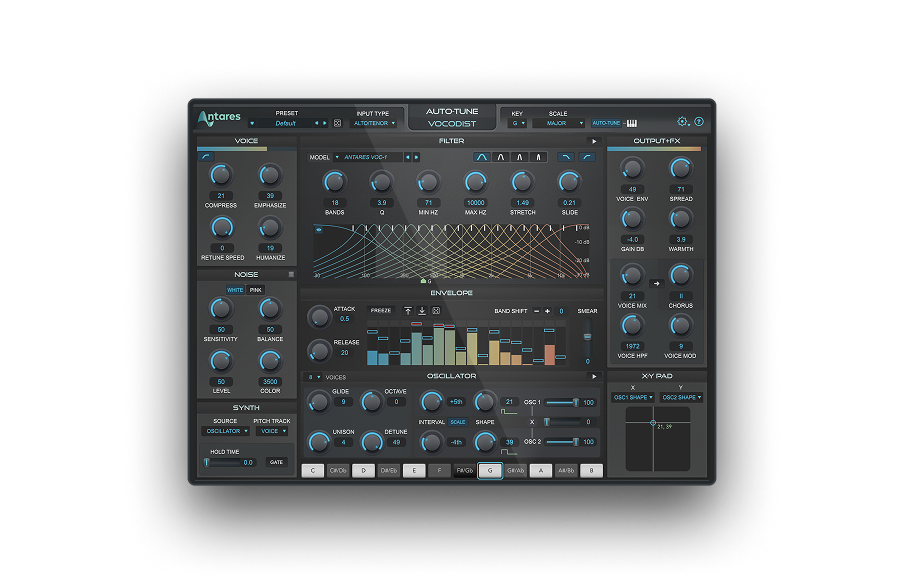
Vocodist
The Human Voice. Synthesized.
What Kinds of Signals Can I Use?
The traditional use of a vocoder involves using a voice as the modulator and a synthesized tone as the carrier. But the possibilities are limitless:
- Voice as Modulator: This is the classic setup. When a person speaks or sings into a microphone, the vocoder analyzes the spectral content of the voice.
- Synthesizers as Carriers: Common carriers include sawtooth waves, square waves, and other rich harmonic sounds. These provide the "musical" or sound quality that the vocoder gives to the modulator.
- Percussive Sounds as Carriers: Why not? Using drums or other percussive sounds as the carrier will give you the rhythmic, chopped effects.
- Ambient Sounds as Carriers: You can get creative and use nature sounds, city noises, or any kind of ambient sound to create unique textures for your tracks.
- Acoustic Instruments as Carriers: Instruments like guitars or strings can be used as carriers, too. This produces a blend of instrumental tones and the vocal characteristics of the modulator.
The beauty of a vocoder lies in its versatility. Any sound source can be a modulator or a carrier, allowing endless possibilities.
What Are the Parameters of Vocoder Plug-ins?
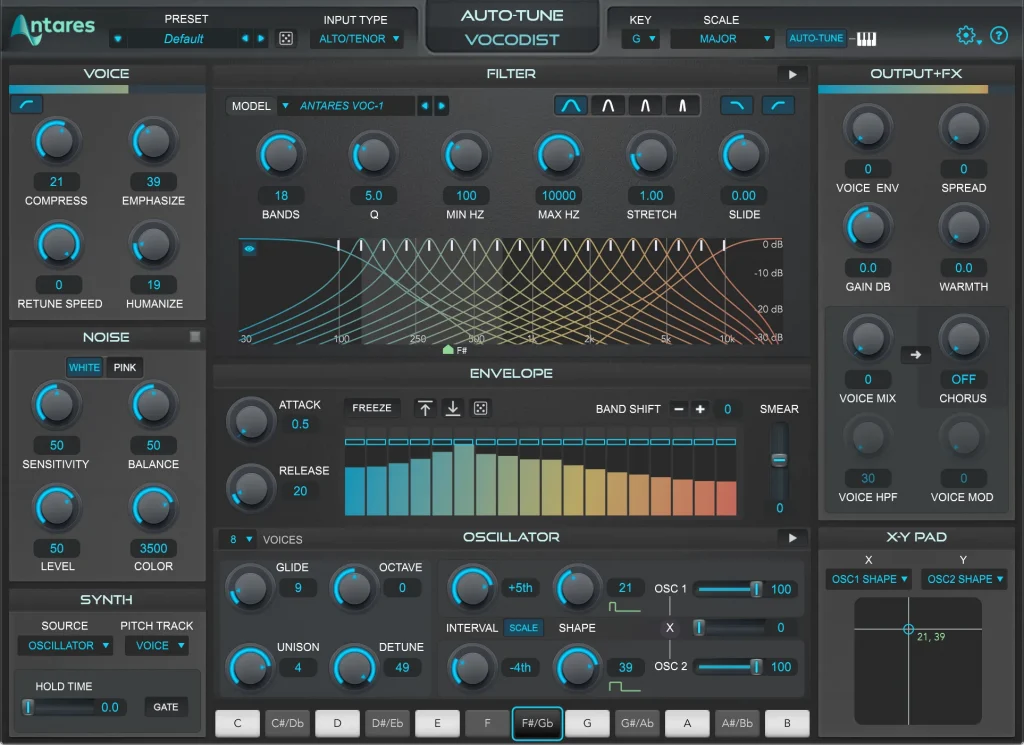
Vocoder plug-ins have various parameters that allow you to shape and control the sound. Here are some common controls and features you'll likely encounter:
Band Count: Determines the number of frequency bands the vocoder uses to analyze and shape the sound. More bands generally provide a clearer, more detailed sound. Fewer bands give a more vintage, lo-fi character to the effect.
Formant Shift: Adjusts the frequency characteristics of the sound, making the voice sound deeper or more high-pitched without actually changing its pitch.
Carrier Signal Input: Allows you to select the carrier signal, whether it's from a synthesizer, a sample, or any other sound source.
Modulator Input: Where you input the modulating signal, typically a voice.
Envelope: Parameters typically include attack, decay, sustain, and release (ADSR) settings. These control how quickly the vocoder responds to changes in the modulator's volume and spectral content.
Mix or Dry/Wet: This knob controls the balance between the original and vocoded sounds. Turning it fully 'wet' would output only the vocoded sound, while setting it to 'dry' would give you the vocoder effect entirely.
High-Pass and Low-Pass Filters: These filters can further sculpt the sound by removing unwanted low or high frequencies.
Unvoiced/Voiced Detection: Some vocoders can detect and process unvoiced sounds (like sibilants or breaths) differently, often by mixing in noise or sibilant sounds to make them more pronounced.
Mono/Stereo Mode: Determines whether the vocoded output is mono or stereo. Some vocoders also offer stereo widening options.
Harmonic Controls: Plug-ins might have additional controls for adjusting the harmonic content of the output. This can be used to enhance or diminish certain harmonics.
Preset Options: Like many plug-ins, vocoders often have presets that generate predetermined sounds or effects.
Output Level or Gain: Controls the output volume of the vocoded signal.

How to Use a Vocoder in Music Production
Vocoders have found their way into many genres of music. From pop and electronic to hip-hop and avant-garde music, they can be used in different ways. For classic robotic voices, especially synthesized tones, a vocoder is an excellent option to produce that iconic sound.
First, if you want to know how to use vocoders, start by recording perfectly clean vocals. The clearer the modulating signal (usually vocals), the better the vocoder will work. You might want to apply basic EQ to the vocals to remove very low frequencies and avoid muddiness.
Next, you’ll want to create two tracks: one for the modulator (your voice) and one for the carrier synth (or instrument). Then, insert the vocoder plug-in on the carrier track. If you're using a synthesizer as the carrier, you can control the pitch of the vocoded output. This allows you to "play" the vocoded vocals melodically. This can be especially effective for hooks and choruses.
Now, tweak the parameters to your liking. Start with presets if you're unsure. Vocoder plug-in presets can be great starting points. Adjust the number of bands to find a balance between the original voice and the desired effect.
Finally, mix in the vocals using the dry/wet parameter to maintain some natural vocal presence. Post-vocoder effects, like reverb, delay, and chorus, can greatly enhance the final result.
As mentioned earlier, vocoders aren't limited to vocals. Try using drums or other instruments as a modulator to create unique textures. For a thicker sound, layer multiple vocoded tracks with different carriers or settings. Or, blend the vocoded signal with the dry signal or harmonized versions of the original vocal for a fuller sound.
Overall, there‘s no golden rule when it comes to vocoders. The key is experimenting. Trying unconventional sources as modulators or carriers can lead to unique and unexpected results.
The Talkbox
The Talkbox is often confused with a Vocoder, but there are differences. It’s an instrument that merges the human voice with the tonal qualities of musical instruments, usually with an electric guitar. This produces a sound combining instrumental and vocal characteristics, producing a "talking" instrument effect.
How Does the Talkbox Work?
The Talkbox is simple: it's like a speaker connected to a plastic tube. Instead of emitting sound, the speaker sends the instrument's sound (like a guitar) through the tube. Then, the performer places the other end of this tube in their mouth. As the sound travels through the tube, the performer shapes their mouth to modulate sounds by forming words or vowels. The manipulated sound then gets picked up by a vocal microphone as the performer "sings" or "talks" with their instrument.
While the Talkbox and vocoder may seem similar in that they both produce robotic or synthetic voices, they work in different ways. The vocoder modulates sound using electronic processing, while the Talkbox is more mechanical and uses the performer's mouth shapes.
Vocodist
The Human Voice. Synthesized.
Auto-Tune vs. Vocoder
Auto-Tune and vocoders are extremely popular tools used in music production. While capable of generating similar effects, they are very different.
Auto-Tune is often used as a pitch correction tool. It adjusts the pitch of a vocal or instrument track to ensure they're in tune with the music.
Auto-Tune can also be used subtly, making a vocalist sound in tune without any audible effect. When applied heavily, it creates that characteristic robotic sound, which has become a signature sound in pop and hip-hop.
Conversely, a vocoder modulates two audio signals: a carrier (often a synthesized musical tone) and a modulator (typically a voice). It creates the famous vocal effect by shaping the carrier signal based on the modulator's frequency characteristics.
The Future of the Vocoder
Today, you can recreate the perfect vocoder effect on your DAW with Auto-Tune Vocodist.
This vocoder plug-in features models of all the classic vocoders made popular by artists like Daft Punk and Kraftwerk. It also includes a collection of artist presets. With Auto-Tune built in, you’ll have full control over the pitch of the vocoded sound with your voice. If you want to explore beyond the classic sound, built-in vocal effects like analog tube saturation and ring modulation can take your vocals to the next level.
Final Thoughts
Vocoders have a long history in the world of music production and create a truly iconic effect. By understanding its essential functions and experimenting with it, you can sculpt a unique, innovative, timeless signature sound.

Exclusive AutoTune Content

Vocodist

AutoTune Unlimited

AutoTune 2026 and Metamorph
Now Included

Antares Editorial
Antares is a leading developer of software for music recording and live performance. For over 20 years, Antares has powered the music of top-charting and indie artists with products including the industry standard for pitch correction, AutoTune™.