

Harmony is to music what color is to a canvas. It adds depth, emotion, and richness that transforms a melody into a full-bodied musical experience. Whether you're a singer or a producer, harmonizing vocals is a vital skill for musicians.
As music technology evolves, so do the tools that can help you achieve perfect harmony. In the age of digital audio workstations and cutting-edge software, you don't have to be a musical prodigy to craft stunning vocal harmonies.
The Basics of Harmonizing
Harmonizing a vocal melody requires knowledge of music theory, a keen ear, and impeccable timing. At the heart of harmonization lie two fundamental harmonies: consonant and dissonant.
- Consonant harmonies offer a pleasing and resolved sound, evoking a sense of completion.
- Dissonant harmonies introduce tension. This tension often seeks resolution, typically moving towards a consonant harmony.
When we go deeper, we discover different harmonies like parallel, contrary, and oblique. Each harmony adds a unique taste to a composition.
Ensembles that have more than one singer usually divide the harmonizing roles. The main vocalist sings the melody while the supporting vocalists add the harmonies. These harmonies result from the connections between musical notes. These are explained by intervals, chords, and scales.
- An interval denotes the gap between two musical notes.
- Chords are conglomerations of notes played, established by piling intervals.
- Scales represent sequences of musical notes in either ascending or descending order. A grasp of scales is vital as harmonies usually draw from notes that align with the melody's scale.

Harmonizing in Different Genres
Harmony is a versatile tool for any band's musical palette. You can use it to create sweet melodies in pop music, soulful blends in R&B, and complex arrangements in jazz. The type of music determines how to harmonize and the difficulties that come with it.
Pop
In pop music, harmonies are typically used to amplify the emotional impact of a hook. The challenge here is to keep it simple yet impactful. Focus on creating ear-catching hooks without overwhelming the melody.
R&B
R&B often features intricate harmonies and runs. In R&B, harmonizing, vocal control, and timing are important. The singer should feel the groove and make the melody stronger with clear harmonies.
Jazz
Jazz harmonies are complex and dissonant. They require a deep understanding of scales and modes. The harmony is as fluid as the melody, so you need to be well-versed in theory and willing to let go and improvise.
Rock
Both rock and hard rock use harmonies to strengthen the overall sound. When done right, harmonies in rock music should sound like this.
Modern vocal plug-ins are versatile and can be customized to meet the specific needs of various genres. If you want to harmonize vocals in pop, you might opt for a subtle, natural effect to preserve the emotional nuance while ensuring pitch accuracy.
Genres like R&B and jazz often feature intricate vocal runs and complex harmonies. To make it easier, you can use more advanced options for harmonizing. These options let you fine-tune and control vocal modulation.
The Power of Technology in Harmonizing
Thanks to DAW, anyone can create beautiful vocal harmonies. Let's look at how to use these technological advancements for harmonizing using the most common DAWs for music production.
Adobe Audition:
- Import your lead vocal track into Adobe Audition.
- Create a duplicate track for harmonizing.
- Use the 'Pitch Shifter' effect to alter the pitch of your duplicate track to create harmony.
- Tweak the settings until you achieve the perfect sound.
Logic Pro X:
- Load your vocal track into Logic Pro X.
- Select 'Flex Pitch' to manually adjust the pitch of individual notes.
- Add harmony by duplicating the track and adjusting pitches to create complementary intervals.
- Use the 'Space Designer' plug-in to add reverb for a more blended sound.
Pro Tools:
- Open your session in Pro Tools and import the vocal track.
- Duplicate the track for harmonizing.
- Use the 'Elastic Pitch' feature to change the pitch of the duplicate track.
- Experiment with different intervals and chords to achieve the desired harmony.
Ableton Live:
- Import your lead vocal track into Ableton Live and duplicate it.
- Use the 'Harmony-to-MIDI' function on the duplicated track.
- Apply Ableton's 'Warp' feature for precise timing adjustments.
- Add finishing touches with Ableton's built-in audio effects.
Artificial Intelligence has revolutionized music production, and harmonizing vocals is no exception. AI tools can analyze a lead vocal line and generate harmonies that fit within a given key and scale.
Creating Harmony with Auto-Tune
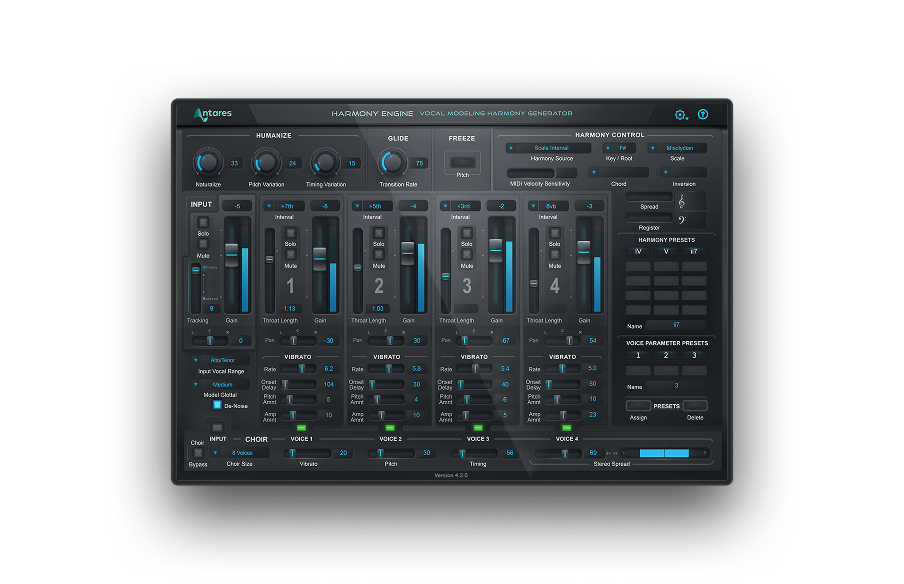
Throughout the years, Antares' Auto-Tune has become a flexible tool for making high-quality vocal textures. Harmony Engine, designed for harmonizing vocals, is an advanced Automatic Vocal Harmony Generator for real-time harmony creation. With this advanced plug-in, musicians and producers can create professional harmony arrangements using just one vocal or instrument track.
One of its main features is the ability to generate full-bodied harmonic layers from a solitary vocal or instrumental source. For those seeking greater control, Harmony Engine offers up to four high-quality harmony voices that can be fine-tuned for vocal character, vibrato, and pan settings. This gives you the possibility to generate anything from realistic to extreme harmonic effects.
The plug-in allows you to craft your vocal arrangements note-by-note or to perform them using a MIDI controller. Or, you can input the chords and let Harmony Engine automate the process. Harmony Engine has extra features like Humanize control for natural-sounding performances. It is also compatible with Auto-Key plugin and Auto-Key Mobile. Harmony Engine is a comprehensive solution for vocal harmonization.
Many popular artists across different genres have used vocal harmonizing in their tracks. The Weeknd and Frank Ocean use harmonizing vocals to create captivating sounds. They add emotion to their melodies with intricate harmonies.
Easy Guide on Setting Auto-Tune Parameters for Harmonizing Vocals
- Select the Key and Scale: Knowing the key and scale of your song will help you set the parameters.
- Choose the Harmony Type: Harmony Engine offers various harmony types like parallel, octave, or chordal harmonies. Select the one that best suits your track.
- Adjust the 'Retune Speed': This controls how the software corrects the pitch. For natural-sounding harmonies, opt for a slower retune speed.
- Customize the 'Humanize' Setting: This feature introduces slight pitch variations, making the harmonies more natural.
- Test and Tweak: After setting the parameters, test the harmonies to ensure they blend well with the lead vocals. Make adjustments as needed.
If this is your first time using harmonizing tools, here are our recommendations.
- Start Simple: If you're new to the harmonizing process, begin with harmonies like thirds or fifths. Gradually move to more complex arrangements.
- Use Presets: Harmony Engine comes with crafted harmony settings. These can be a good starting point for those unfamiliar with musical theory.
- Layer Gradually: Start by adding one harmony line at a time. Listen to how it blends with the melody before adding more layers.
Our Plug-ins and DAW Integration
Antares offers a suite of plug-ins, like Harmony Engine. It integrates with popular DAWs like Adobe Audition, Logic Pro X, and Pro Tools. Harmony Engine is easy to use and effective, offering preset and customizable options to suit your needs. Antares offers solutions for real-time vocal harmony and multi-part harmonies.

Harmony Engine
Automatic Vocal Harmony Generator
Learn to Harmonize at Home
Home studios have made music production more accessible to amateurs and professionals alike. To improve your harmonizing skills, a home recording space is a good step in your career as a producer.
Investing in the right equipment is important. While technology can help you achieve stunning vocal harmonies, you need a solid foundation.
Soundproofing is essential to ensure a clean and clear recording. Basic soundproofing equipment like foam panels or diffusers can go a long way in reducing unwanted noise and echoes.
Next, make sure you choose the right microphone for your recording sessions. A condenser microphone with a broad frequency response can capture the nuances of your vocals, resulting in a more natural and engaging sound. Tip: you don't need a thousand mics to get the sound you want. The Mic-Mod plug-in from Antares can make your mics sound like the ones you wish you had.
A good audio interface is needed to transfer sound from your microphone to your computer. The same goes for your digital audio workstation. Having the right recording software can have a huge impact on your workflow. DAWs with an intuitive interface like GarageBand or FL Studio 12 can be a great starting point for beginners.
Antares has plug-in bundles for home studios, making it easier to get professional vocal harmonies. Our plug-ins come with user-friendly interfaces and preset modes, allowing you to harmonize vocals with a few clicks. They integrate with popular home studio DAWs like GarageBand, Logic Pro, and FL Studio. For those who want to dig deeper, advanced customization options are also available. This lets you fine-tune your harmonies to absolute perfection.
Expert Tips on Maintaining Vocal Health
Mastering harmonization requires continuous practice, and daily training is essential. Technology can help, but it's not enough. The following tips can help you take your harmonizing skills to the next level.
Warm-Up: Like any other muscle, your vocal cords need to be warmed up before rigorous use. Incorporate exercises that gradually stretch and activate your vocal cords. This can be anything from humming or scales to arpeggios. Start in the middle of your vocal range and then extend outward to the lower and higher extremes. This progressive approach helps prevent vocal strain and optimizes vocal performance.
Hydration: Stay hydrated to keep your vocal cords lubricated. This is crucial when practicing intricate harmonies that need quick vocal shifts. Avoid dehydrating substances such as caffeine and alcohol.
Rest: Give your vocal cords ample time to rest—especially after long practice sessions or performances.
Mixing and Mastering for Harmony
Creating a balanced and harmonious sound isn't only about professional recording. Post-production can transform cacophony into a symphony or vice versa. Let's discuss some advanced techniques and insights into how acoustics are pivotal in elevating your harmonized vocals.

Advanced Mixing Techniques
Level Balancing: Before diving into EQ and effects, make sure the volume levels of your harmonies are well-balanced with the lead vocal. This ensures that the harmonies support rather than overpower the main melody.
Equalization (EQ): Fine-tune the EQ settings to create space for each vocal line. This prevents frequency clashing and allows each harmony to shine through.
Panning: Use panning to spatially separate different harmonies. This not only makes for a more engaging stereo image but also allows each harmony to be distinctly heard.
Compression: Light compression can help level the dynamics, making the vocals blend seamlessly.
Reverb and Delay: These effects can add depth and space to your harmonies. They should be used carefully to avoid muddying your mix.
Automation: To make your harmonies more interesting, you can use automation to slowly add or take away specific parts. This can add interest and depth to your arrangement.
The Role of Room Acoustics
To showcase your harmonized vocals effectively, learn how to mix and master harmony. This will ensure that every detail is heard and appreciated. However, post-production tools cannot enhance a vocal performance recorded in a subpar environment.
With the right techniques and understanding of acoustics, your harmonies will be pitch-perfect and emotionally resonant, and captivating.
Room Acoustics: The acoustic properties of your recording space can impact how harmonized vocals sound. Poor acoustics can introduce unwanted reverberations, diluting the clarity of harmonies. This is a complex topic we discussed in a recent article.
Mic Placement: The distance and angle of the microphone can affect how harmonies are captured. Experiment with different setups to find what enhances your harmonized vocals best.
Post-Production: In post-production, acoustic simulations can recreate different environments to enhance your harmonies.
Mastering for Acoustic Consistency: Mastering ensures that your track sounds consistent on various playback systems. Pay close attention to how your harmonies translate across different speakers and headphones.
Final Thoughts
Harmonizing vocals is an art that demands knowledge, skills, and dedication despite modern technology's accessibility. Once you master it, it can bring to life the best version of your vocal productions and upgrade your skills as a songwriter. Vocal plug-ins like Harmony Engine can help you achieve perfect harmony and elevate your vocal arrangements to new heights.


AutoTune Unlimited
The Ultimate Vocal Production Suite

Exclusive AutoTune Content

Harmony Engine

AutoTune Unlimited

AutoTune 2026 and Metamorph
Now Included

Antares Editorial
Antares is a leading developer of software for music recording and live performance. For over 20 years, Antares has powered the music of top-charting and indie artists with products including the industry standard for pitch correction, AutoTune™.