

Equalization plays a crucial role in music production, especially during the mastering phase: it’s one of those effects that can take your track to the next level, adding the depth and tonal clarity it needs to become a worldwide success.
By understanding the role of EQ in mastering, you’ll be able to craft the perfect soundscape by adjusting frequencies when needed and enhancing the overall balance of your mix. In this short guide, we'll learn about the role of EQ in mastering and how to make the most of this powerful tool when mastering your next tracks.
What is Equalization (EQ)?

Equalization allows us to manipulate the frequencies of a mix by adjusting the various frequency bands. The purpose of EQ in mastering goes beyond just fixing frequency imbalances or adjusting levels: by carefully boosting or mitigating certain frequencies, you can add warmth, clarity, or sparkle to individual instruments or the entire mix.
To understand the importance of EQ, let's explore the concept of frequency bands. Sound can be broken down into different frequency ranges, each with its own characteristics. The low frequencies (bass) are the foundation of your track and help make it more engaging, the mid-range frequencies contribute to the body and presence of musical instruments, and the high frequencies (treble) add brightness and clarity to your mix.
Mastering engineers use various EQ techniques, such as shelving filters, parametric equalizers, and subtractive EQ to transform a final mix into a professional, carefully-mastered track ready for publication.
Mastering in a Nutshell
There’s no point in talking about the benefits of EQ without clarifying the purpose of audio mastering.
Mastering is the final step in the music production process. The main goal of mastering is to ensure that the music sounds its best across a wide range of playback methods, whether played on the radio, streamed online, or listened to on a physical format like a CD or vinyl record.
Aside from technical adjustments, mastering can help give the album a sense of continuity, with a balanced and recognizable sound signature that defines the whole work. Some crucial mastering objectives include enhancing the mix's overall quality, optimizing it for different playback systems, and achieving industry-standard sound and audio levels.
Exploring Specific EQ Elements
Gain adjustment plays a crucial role in balancing the overall volume and dynamics of the mix. This process involves carefully adjusting the gain levels of different frequency ranges. For example, if the mid-range frequencies of a mix sound too dominant, a gentle gain reduction in that range can help blend it out.
Let's take a quick look at some of the most common types of EQs, and their parameters:
- High-pass filters: This filter is used to remove unwanted low-frequency. When mastering a vocal-driven track, applying a high-pass filter at around 30-40 Hz can help make the vocals stand out.
- Low-pass filters: This filter removes high-frequency content that may be harsh or overwhelming.
- Shelf filters: These filters can boost or mitigate frequencies above or below a specific point, simultaneously affecting a wide range of frequencies.
- Parametric EQ: This effect offers precise control over frequency bands, allowing detailed adjustments to specific frequencies.
- Dynamic EQ: Combines equalization with dynamic processing so the frequency bands are boosted or reduced automatically once they pass a certain threshold.
- Mid-side EQ: Allows separate equalization of the center (mid) and side audio in a stereo mix, providing greater control over the stereo image.
- Linear-phase EQ: Sometimes, while EQing, certain harmonies are delayed and sound imprecise. Linear-phase EQ preserves the audio signal phase, ensuring minimal phase distortion.


AutoTune Unlimited
The Ultimate Vocal Production Suite
EQ Mastering Rules to Live By
Use these basic steps to guide you through the mastering process.
- Address the Issues First: Identify and address any significant frequency imbalances or tonal issues before diving into finer adjustments.
- Preserve the Mix Balance: When applying EQ during mastering, always prioritize preserving the mix balance. A gentle boost in the vocal frequency range can bring it forward without overshadowing other instruments.
- Consider Context and Genre: Consider the genre, target audience, and audio format the music is intended for. Every genre has distinct sonic characteristics, and mastering EQ should align with the listeners' expectations.
- Utilize Reference Tracks: There is no better way to create a professional master than comparing your work with a finished track that aligns with the sound you aim to achieve. Finding a suitable reference track will save you time and simplify your workflow significantly.
- Automate for dynamic impact: Automating EQ adjustments can add depth and dynamics to your mix, enhancing transitions and emphasizing musical moments.
- Trust Your Ears, and Take Regular Breaks: After working on a mix for some time, take a break, work on something else, and get back to it with fresh ears to make better EQ decisions. Remember that mastering is a critical listening process and requires your full attention.
Choosing the Right Plug-ins for Mastering
Nowadays, plug-ins have become indispensable for mastering, offering endless possibilities for sculpting sounds without investing thousands of dollars in gear.
There are several types of EQ plug-ins. For example, linear-phase EQ plug-ins ensure accurate frequency response, while dynamic EQ plug-ins combine the benefits of equalization and dynamic processing into one effect, enabling frequency-specific adjustments based on the input signal's dynamics for more targeted and nuanced control.
If you’re looking for an excellent collection of EQ tools, check out the Universal Audio UAD Precision EQ Collection, with its carefully-crafted selection of analog-inspired EQ plug-ins that can enhance the warmth and uniqueness of your track.
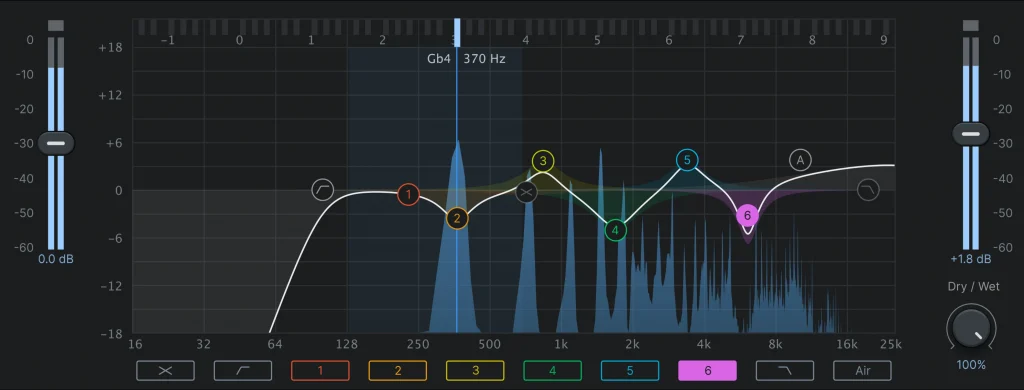
FabFilter Pro-Q 3 is well-known for its versatile features and intuitive interface, plus it offers a spectrum analyzer for visual feedback during the mastering process.
AutoTune Unlimited
The Ultimate Vocal Production Suite
Integration with Digital Audio Workstations (DAWs)
One of the major advantages of using plug-ins and virtual instruments (VSTs) is their seamless integration with popular Digital Audio Workstations (DAWs). DAWs such as Ableton Live, Logic Pro, Pro Tools, Cubase, and Studio One offer extensive support for plug-ins and VSTs.
Most plug-ins are designed to work with multiple DAWs and support various plugin formats, including VST, VST3, AU, and AAX. This ensures that you can use your plug-ins on the DAW of your choice.
Integrating EQ plug-ins into the mastering workflow brings many advantages. Firstly, it allows precise EQ adjustments directly within the DAW with a real-time control that provides instant feedback. Another advantage is the ability to automate EQ adjustments: professional DAWs offer comprehensive automation capabilities, which can streamline your workflow significantly if you’re regularly mastering.
Elevate Your Masters with Auto-Tune Vocal EQ
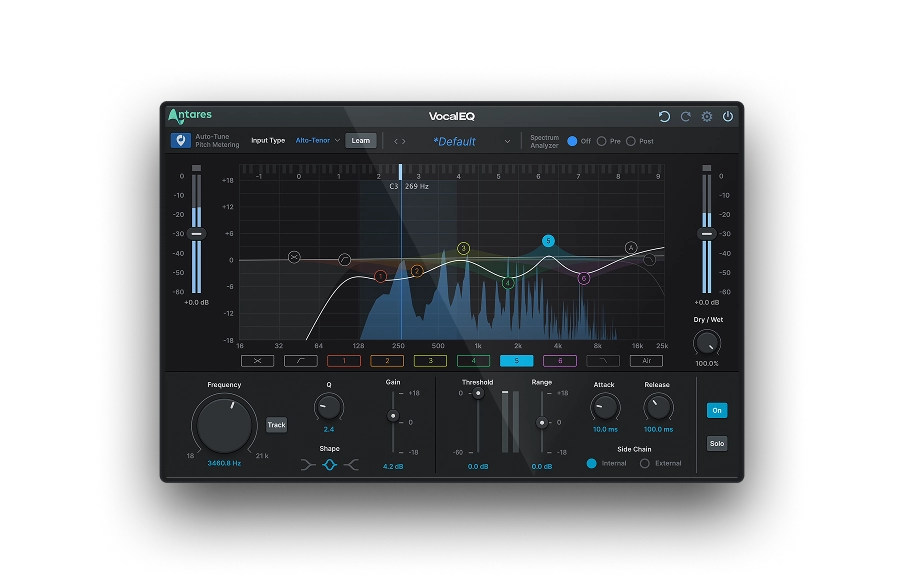
When it comes to vocal processing in mastering, Auto-Tune Vocal EQ is a game-changer: an invaluable tool for any music producer who wants complete control over their vocal tracks and to create an unforgettable sound.

Here are some key advantages and benefits of using Auto-Tune Vocal EQ for vocals:
- Vocal-Specific Processing: Vocal EQ is optimized for mastering vocal tracks, providing targeted EQ processing tailored to enhance vocal clarity and intelligibility.
- Precise Control and Flexibility: This plug-in offers a wide range of frequency bands and parameters, giving you complete control over the vocal EQ processing.
- Natural and Transparent Results: Vocal EQ provides transparent enhancements to your vocals without introducing artifacts. It ensures that your vocal tracks retain their natural qualities while enhancing their sonic characteristics, resulting in a more polished and professional vocal sound without sacrificing authenticity.

Vocal EQ
Clarity Above All
Final Thoughts
Detailed and thorough equalization can transform your track and create a sound that stands against the competition in a sea of major releases. We hope this guide showed you the importance of this crucial mastering tool and how you can make the most of it when mastering your songs.
Good luck, and stay creative!

Exclusive AutoTune Content

Vocal EQ

AutoTune Unlimited

AutoTune 2026 and Metamorph
Now Included

Antares Editorial
Antares is a leading developer of software for music recording and live performance. For over 20 years, Antares has powered the music of top-charting and indie artists with products including the industry standard for pitch correction, AutoTune™.