

Along with honing your music production skills, expanding your sonic palette should be a top priority when you want to upgrade as an artist. Nowadays, we have access to endless instruments and effects that can help us create a unique sound, even without setting foot in a recording studio.
This is thanks to the versatility and simplicity of VST plug-ins. These virtual tools can give us access to musical instruments and effects worth thousands of dollars, all accessible directly from our DAW of choice.
What VST plug-ins are, how they work, and where to find them is the topic of today's article.
Let’s dive in!
What Is a VST Audio Plug-in?
Even if you are new to digital music production, you’ve probably read or heard about VST plug-ins. A virtual studio technology plug-in, commonly known as a VST plug-in, is software that emulates hardware and lets you use it from your audio workstation.
When digital music production became popular, producers wanted to achieve the same results they could obtain in the studio. In 1996 Steinberg developed VST plug-ins to recreate a studio environment within an operative system. A VST plug-in can be an effect, such as an EQ, a vocal effect, a compressor, distortion, or even emulate musical instruments such as synths, pianos, drums, strings, and more.
VSTs are essential in music production because they add depth and color to your sound. Without VST, chances are your recordings won’t sound as professional as they should. Besides, VSTs make music production and post-production accessible and affordable for anyone who wants to make music.


AutoTune Unlimited
The Ultimate Vocal Production Suite
Different Types of Plug-ins
VST plug-ins can be classified into two main categories: virtual instruments and effects processors.
Effects processors are those VSTs that process audio to add effects to your music. They allow you to add that distorted sound to your guitar recording, additional saturation to your mix, and other effects such as EQ, compressor, reverb, delay, and more.
Virtual instruments plug-ins emulate the sound of real instruments like a synth, piano, drum machine, guitar, or bass guitar. These virtual instruments allow you to create music via MIDI controllers or your computer's keyboard, even if you've never played the musical instrument before. An easy way to tell them apart is the following: VST instruments generate audio while VST effects process audio.

How To Choose the Best Plug-in
So now you’re ready to look for the best VST to help you produce professional music. But among the many options out there, you’ll need to select those that better fit your style and workflow.
Here are a few tips to help you choose which is the best plug-in for you.
AutoTune Unlimited
The Ultimate Vocal Production Suite
What's Your Goal?
The first thing is, what are you aiming for? If you’re only writing music, you’ll probably want to focus on virtual instruments and a few effects like reverb, distortion for guitar and bass, and vocal effects like pitch correction. If audio mixing and mastering are your bread and butter, you’ll need effects processors like EQs, compressors, and limiters to create the perfect sound.
What Hardware Do You Own?
The second thing to consider is what equipment you already have and how you can improve your workflow. I’m talking about hardware, ranging from your computer to audio equipment like a MIDI controller or audio interface. Music production software will demand a lot from your CPU; plus, ensure you have enough hard drive space for your growing list of projects.
How's Your Budget?
Finally, how much can you spend on VST plug-ins? If you have a dedicated budget for software, look for plug-ins within that range. Luckily for low-budget producers, free VSTs of any kind are available.

How To Choose the Best Plug-in
Here’s a list of some of the best VST plug-ins for music production in 2023. Here you’ll find both VST effects and virtual instruments.
CLA-2A Compressor by Waves
This VST emulates the classic electro-optical tube compressor. The plug-in is simple to use with only two knobs; you can get the compression needed for your music and a switch to select between a compressor and a limiter. The CLA-2A is ideal for acoustic instruments, bass, and vocals.
Pro-Q 3 by FabFilter
The Pro-Q 3 is one of the most beloved EQ plug-ins, as it is pretty straightforward and effective. It includes up to 24 bands, supports linear-phase mode, per band mid/side processing, surround support up to 9.1.6 Dolby Atmos, EQ match, auto gain, and a spectrum grab. The Pro-Q 3 provides a smooth workflow and excellent sound quality.
Addictive Drums 2 by XLN Audio
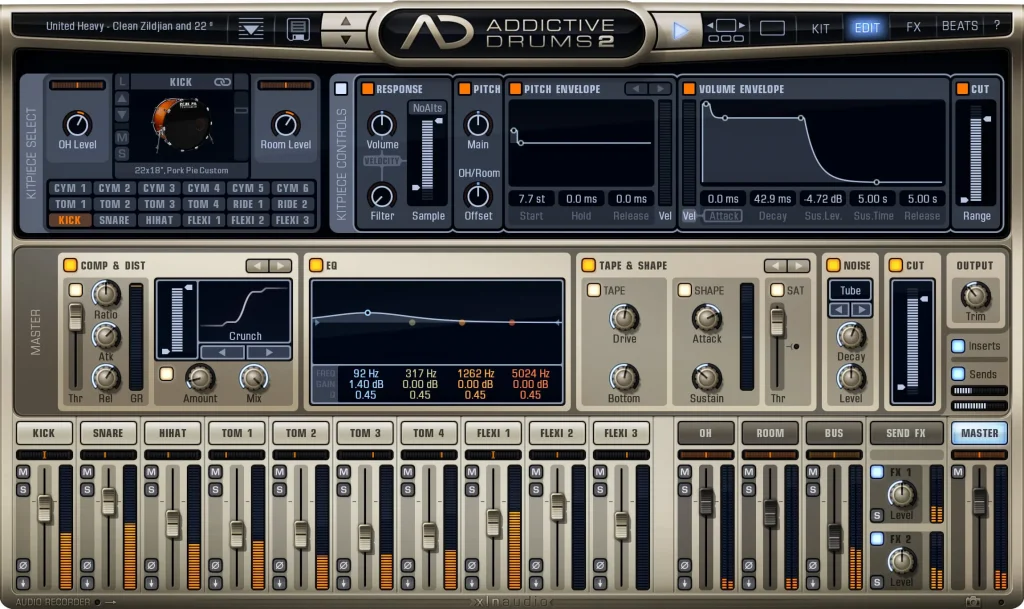
If you're struggling to record drums, Addictive Drums will get the job done without the hassle of hiring a studio drummer. With Addictive Drums, you’ll have access to the authentic sound of professionally recorded acoustic drums, which you can choose according to your work style and genre. Plus, you can also adjust frequencies and apply effects to further personalize your sound.
iZotope Ozone 10
Ozone by iZotope allows you to achieve a professional master thanks to its Master Assistant that will help you get started. With Ozone, you can match a reference track to achieve the sound you are looking for and boost your tracks' loudness safely with its magnified soft clip to keep fidelity and quality.
Serum by Xfer records
Serum is an advanced wavetable synthesizer that allows you to create and edit sounds in a simple and fun way. Import, edit and morph your wavetables in real time. Serum comes with a built-in suite of effects to create sounds from scratch. Because of its simplicity, Serum is one of the most used wavetables, especially popular among EDM producers.
AutoTune Unlimited
The Ultimate Vocal Production Suite

Exclusive AutoTune Content

AutoTune Pro


AutoTune Unlimited

AutoTune 2026 and Metamorph
Now Included

Antares Editorial
Antares is a leading developer of software for music recording and live performance. For over 20 years, Antares has powered the music of top-charting and indie artists with products including the industry standard for pitch correction, AutoTune™.