

Whether in broadcasting, music, film, or online content creation, addressing sibilance is essential to deliver high-quality audio products and enhance the overall impact of the media. In this article, you’ll learn everything you need to know about sibilance.
Sibilance Unveiled: Understand its Definition and Frequency Range
Sibilance refers to the hissing or sharp "s," "sh," "ch," and "z" sounds produced by human speech. These sounds are characterized by high-frequency energy and sometimes sound harsh or distracting when recorded. This occurs when the airflow during speech passes through a narrow space between the tongue and the roof of the mouth, creating a turbulent sound.
Example: "She sells seashells by the seashore."
In this sentence, the sibilant sounds are:
- "s" sound in "sells" and "seashells."
- "sh" sound in "she" and "seashore."
These sibilant sounds create a hissing or sharp quality in the speech. Managing sibilance is essential in audio production to ensure clear and pleasant speech recordings.
Sibilance frequency is the range of frequencies at which sibilant sounds are most pronounced. In audio and speech analysis, sibilance frequencies typically lie at the higher end of the audio spectrum, usually between 4 kHz to 10 kHz or higher.
This frequency range is crucial for audio engineers and producers to identify and control during post-production, as excessive sibilance can lead to audio distortion or even discomfort to the listener.
What Are The Different Types of Sibilance?

Sibilants are produced by creating a narrow opening in the vocal tract, causing turbulence in the airflow. The different types of sibilance vary based on tongue shape, place of articulation, and point of contact on the tongue. Let's explore the most common types of sibilance:
[s] Sound (Voiceless Alveolar Sibilant)
Tongue Shape: The tongue is raised slightly, with the blade (front part) of the tongue in contact with the alveolar ridge, which is the bony ridge behind the upper front teeth.
Place of Articulation: Alveolar, meaning the sound is produced by the airflow being constricted at the alveolar ridge.
Point of Contact on the Tongue: The airflow passes along the sides of the tongue.
Example: [s] as in "sea"
[z] Sound (Voiced Alveolar Sibilant)
Tongue Shape: Similar to [s], the tongue is raised with the blade in contact with the alveolar ridge.
Place of Articulation: Alveolar, similar to [s].
Point of Contact on the Tongue: The difference from [s] is that the vocal cords vibrate, creating a voiced sound.
Example: [z] as in "zebra"
[ʃ] Sound (Voiceless Postalveolar Sibilant)
Tongue Shape: The tongue is raised, and the blade is placed just behind the alveolar ridge, closer to the postalveolar region.
Place of Articulation: Postalveolar, meaning the sound is produced by constricting the airflow slightly farther back than the alveolar ridge.
Point of Contact on the Tongue: The airflow passes along the sides of the tongue.
Example: [ʃ] as in "sheep"
[ʒ] Sound (Voiced Postalveolar Sibilant)
Tongue Shape: Similar to [ʃ], the tongue is raised with the blade placed just behind the alveolar ridge.
Place of Articulation: Postalveolar, similar to [ʃ].
Point of Contact on the Tongue: The difference from [ʃ] is that the vocal cords vibrate, creating a voiced sound.
Example: [ʒ] as in "measure"
Vocal De-Esser
AI-Powered Sibilance Control
How To Reduce The “S” Sounds While Recording
Reducing “S” sounds in a recording is crucial for achieving clear and pleasant audio. There are two primary techniques used to address sibilance: "fix the issue at the source" or "fix it in the mix."
- Fix it at the Source: This technique minimizes sibilance during the recording process.
- Fix it in the Mix: If sibilance is still present in the recording, it can be addressed during the post-production mixing process.
Combining these approaches allows you to effectively manage sibilance and ensure a smoother, more professional-sounding recording.
Tips On Preventing Sibilance While Recording
Start by positioning the microphone slightly off-axis from the speaker's mouth. Doing so reduces the direct exposure to the sibilant sounds and captures a smoother vocal tone.
It is also recommended to use a pop filter or a foam windscreen in front of the microphone. This helps to disperse the force of the plosive sounds (like "p" and "b") and reduce the intensity of sibilance. Avoid speaking too close to the microphone, as this can accentuate sibilant sounds.
How To Reduce Sibilance In A Mix

Although it is best to prevent sibilance at the source, there may be occasions where some amount of sibilance slips through despite your best efforts. Below are several techniques that can be used to address sibilance effectively in post-production.
Dynamic Range Compression
Compression is a common audio processing technique used to control the dynamic range of a recording. In the context of reducing sibilance, a compressor can be set up with a fast attack and release time to specifically target the sibilant peaks. By compressing the sibilant sounds, the overall level of the harsh frequencies is reduced, resulting in a smoother and more controlled vocal track.
Multiband Compression
This is when you apply different compression settings to specific frequency bands. In this case, you can set up a multiband compressor to target the frequency range where sibilance is most prominent (typically around 4 kHz to 10 kHz).
Manual Volume Automation
For more precise control, use manual volume automation to reduce the level of sibilant sounds at specific points in the recording.
Equalization (EQ)
Identify the frequency range where sibilance is most prominent (typically between 4 kHz to 10 kHz) and use an EQ plug-in to apply a narrow cut within that range to reduce the harshness.
Using a De-Esser
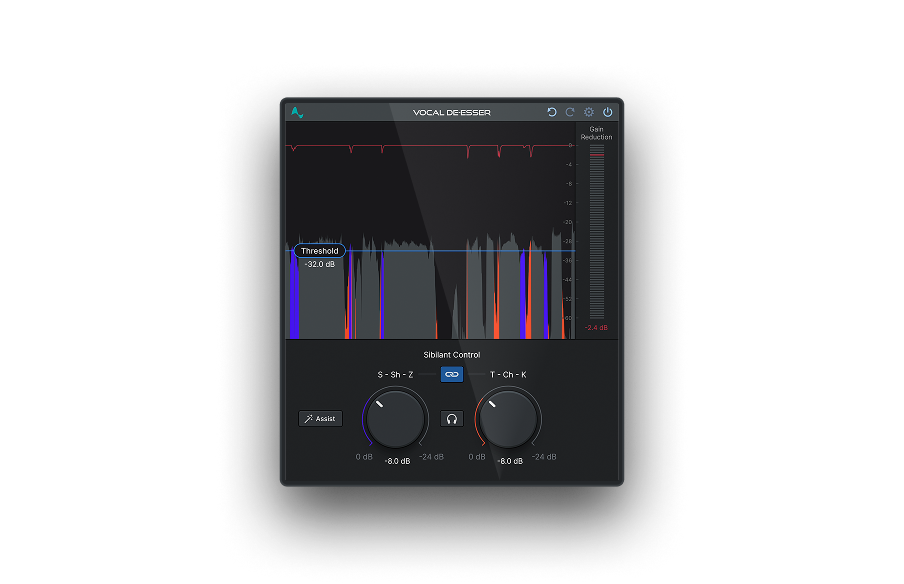
The De-Esser is a tool that specifically addresses and controls sibilance in vocal recordings. Its primary purpose is to reduce the harsh "s," "sh," "ch," and "z" sounds, which can be distracting and unpleasant to the listener.
If you want to take your audio recordings to the next level and ensure a captivating listening experience, consider incorporating Vocal De-Esser into your toolkit. Its advanced algorithm automatically detects and targets the sibilant frequencies, allowing you to effortlessly achieve a professional and well-balanced vocal mix.
Using Equalization To Reduce Sibilance
Auto-Tune Vocal EQ
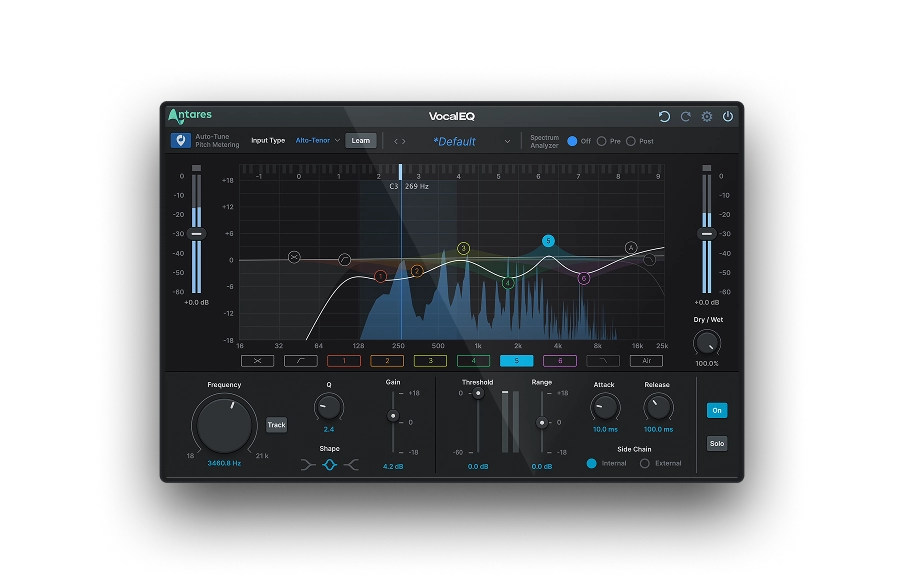
Equalization (EQ) is essential in reducing sibilance in audio recordings. By selectively adjusting specific frequency ranges, typically targeting the higher frequencies where sibilant sounds reside (around 4 kHz to 10 kHz), EQ allows you to smoothen the sounds. With AutoTune Vocal EQ, you can make targeted cuts (notches), monitor the results, and fine-tune for a polished, professional sound.

Vocal EQ
Clarity Above All
Using Fader To Reduce Sibilance
The fader's primary role is to control the overall volume and balance of the mix, which indirectly contributes to how prominent sibilance is in the final audio recording. Here's how the fader can be used to help address sibilance:
- Relative Balance: Lowering the fader level of the vocal can reduce the prominence of sibilant sounds, making them less pronounced in the overall audio mix.
- Masking: Sibilant sounds can sometimes mask other important elements in the mix. You can minimize the masking effect of sibilance, allowing other parts of the mix to shine through.
A few words on frequency masking, a common issue that audio engineers and producers encounter regularly. It happens when one sound obfuscates the clarity of another sound within a similar frequency range, creating a muddy and unprofessional mix.
When it comes to sibilance, while you can use a fader to mitigate the issue, your best bet is an EQ. First, use a spectrum analyzer to identify the conflicting frequencies. Although most sibilances range between 3 kHz to 8 kHz (female voices have sibilant sounds at a higher frequency than male's), do take a look at the whole spectrum to identify all the possible frequency issues before applying the EQ.
Next, use a combination of high-pass and low-pass filters to target the conflicting frequencies, ensuring you don't compromise the clarity of your mix. By cutting and boosting frequencies, you'll be able to enhance the dominant frequencies and mitigate plosive sounds.
- Riding the Fader: An audio engineer can manually adjust the vocal level in real-time during the mixing process. When a sibilant word or phrase occurs, they can quickly lower the fader level for those specific moments to reduce the intensity of sibilance.
- Volume Automation: In a DAW, faders can be automated to adjust volume levels at specific points in the recording. For example, you can automate the fader to reduce the volume during sibilant-heavy sections of the vocal performance.


AutoTune Unlimited
The Ultimate Vocal Production Suite
Final Thoughts
Sibilance significantly impacts various audio production and communication areas, including radio, music production, TV, podcasts, and more. Excessive sibilance can lead to distraction, reduced engagement, and compromised clarity in vocal performances. Through skillful use of de-essers, equalizers, fader control, and microphone recording techniques, you can effectively mitigate sibilance and improve the quality of your audio.
Good luck!
Frequently Asked Questions
What frequencies does sibilance occur at?
Sibilance typically occurs between 2 kHz and 10 kHz, though the exact range varies by voice. Male voices tend to produce sibilance around 5–6 kHz, while female voices usually peak higher at 7–8 kHz. Engineers most commonly target 6–8 kHz when treating sibilance in a vocal mix.
What causes sibilance in a recording?
The three most common causes of sibilance are microphone choice, microphone placement, and natural vocal characteristics. Condenser microphones emphasize high frequencies and are more likely to capture sibilance than dynamic mics. Positioning the mic directly in front of the mouth rather than slightly above and angled downward also amplifies sibilant consonants. Some singers naturally produce more sibilance depending on their vocal anatomy and pronunciation habits.
How do you fix sibilance in a vocal recording?
The most effective way to fix sibilance is with a de-esser — a specialized dynamic processor that targets and reduces sibilant frequencies only when they exceed a set threshold, leaving the rest of the vocal untouched. EQ can also be used to reduce the 5–8 kHz range, though this affects the entire signal rather than just the problem moments. For the most transparent results, apply de-essing before compression in your signal chain.
What is a de-esser and how does it work?
A de-esser is an audio plugin or hardware processor designed specifically to reduce sibilance. It works like a frequency-specific compressor: when the energy in the sibilance frequency range (typically 5–10 kHz) exceeds a set threshold, the de-esser attenuates only that band, reducing harshness without dulling the rest of the vocal. Modern AI-powered de-essers like Antares Vocal De-Esser adapt dynamically to each vocal performance, detecting sibilance in real time rather than relying on fixed thresholds.
Is sibilance always a problem that needs to be fixed?
Not always. A controlled amount of sibilance adds presence and helps vocals cut through a mix — completely removing it can make a voice sound dull or unnatural. The goal is balance: reduce sibilance when it's distracting or fatiguing to the listener, but preserve enough to keep the vocal sounding alive and clear. The decision depends on the genre, the mix context, and the severity of the sibilant peaks.

Exclusive AutoTune Content
Vocal De-Esser

AutoTune Unlimited

AutoTune 2026 and Metamorph
Now Included

Antares Editorial
Antares is a leading developer of software for music recording and live performance. For over 20 years, Antares has powered the music of top-charting and indie artists with products including the industry standard for pitch correction, AutoTune™.