
Mix automation is a powerful tool that allows you to control and adjust multiple aspects of your mix, such as volume, panning, and effects, which will affect parts of the entirety of your song.
Automation is the process of changing specific settings of your track over time: making adjustments to different elements of your mix and having those changes affect your track at specific moments.
You should use automation in your mix because it allows you plenty of freedom to add movement and dynamics and make accurate adjustments to your music. Furthermore, with automation, you can control the volume of individual tracks or specific sections, fine-tune the overall balance of your mix, create movement by automating parameters like panning, and of course, experiment with many other parameters like filters, delays, and more. Get creative!
What Can Be Automated?
Let’s review a few examples of situations when a music producer could and should use automation.
Vocal Mixing: When working with vocals, automation is crucial, as professional audio engineers do to work on your mix. Here we talk about automating the volume levels to blend the vocals in the mix and adjusting effects such as reverb or delay during specific track sections.
Instrument Solos or Highlighting: In a song with solo instruments or standout sections, you can use automation to emphasize certain parts. After you automate the volume levels or add effects during these parts, you’ll enhance the main instruments and make your piece more engaging.
Drum Builds and Breakdowns: Automation is often used to create build-ups and breakdowns in electronic or dance music. You can build tension and create more impactful transitions between different sections by automating parameters such as volume, filter cutoff, or effects on drum elements.
Effects Sweeps and Drops: By automating parameters like filter cutoff, resonance, or delay feedback, you can achieve impactful drops, build tension, and add excitement to your music.
Sound Design and Cinematic Effects: Automation is used extensively in sound design or cinematic music production to create intriguing and evolving textures. By automating synthesizers, samplers, or effects, you will shape and transform the sonic texture to create immersive soundscapes.
DJ Mixing and Live Performances: Automation plays a crucial role in DJ mixing and live performances, allowing DJs and performers to control and manipulate various parameters in real time. This can include adjusting volume levels, applying effects, or manipulating filters and EQs to create seamless and dynamic mixes.
By automating tasks, you’ll have precise control over how different elements in your music evolve and change over time. Here's a simplified overview of processes that can be automated in music production:
- Volume Automation: You can automate the volume levels of individual tracks or specific parts of a song to control the loudness and softness of different elements.
- Panning Automation: Automation can also be used to control the placement of sounds in the stereo field. By automating panning, you can move sounds from left to right to create space after placing them in different positions.
- Effect Parameters: Many effects like reverb, delay, filters, and modulation can have their parameters automated.
- EQ Adjustments: Equalization (EQ) is used to shape the frequency balance of a sound. You can automate EQ settings at different points in your song, which will help you sculpt the perfect sound.
- Plug-in Parameters: Various plug-ins and virtual instruments used in music production have a range of parameters that can be automated. This includes cutoff frequency, resonance, decay time, and more.
- MIDI Data: This can also be automated, including automating MIDI controller movements or changing instrument settings in MIDI-based compositions.


AutoTune Unlimited
The Ultimate Vocal Production Suite
Practical Applications of Mix Automation
Introduction to Digital Audio Workstations (DAWs)
DAWs (Digital Audio Workstations) are essential tools for modern musicians and mix automation plays a crucial role in producing modern music. The importance of DAWs in automation lies in their user-friendly interfaces, visual representation of automation curves, and flexible automation capabilities. Professional DAWs are platforms to easily create, edit, fine-tune automation, and achieve the desired musical effects.
Practical Applications of Mix Automation
DAWs make it easy to visualize and adjust automation curves through their user-friendly platform. But what exactly should you automate? Here are some practical applications:
Volume Changes: You can automate the volume levels of individual tracks or specific parts of your song to create dynamic changes. For example, you can gradually increase the volume during a chorus or lower it in a quieter part.
Panning Effects: Automation enables you to adjust the placement of sounds in the stereo field. This can make sounds move from left to right or create space and depth in your mix.
Effect Parameters: Automation lets you control the parameters of effects like reverb, delay, filters, and more. For instance, you can automate the decay time of a reverb to make a sound gradually fade away or automate the filter cutoff to create filter sweeps.
EQ Adjustments: You can automate EQ settings to shape the frequency balance of a sound.
Creative Sound Design: Mix automation opens up creative possibilities for sound design. You can automate various parameters of synthesizers, samplers, and virtual instruments to sculpt unique and evolving sounds.
Smooth Transitions: Automation helps achieve seamless transitions between different sections of your song. For example, you can automate the gradual introduction of new elements or smoothly fade in or out certain parts.
Practical Tips for Automation
How to Automate
First, you must identify the parameter you want to automate, such as volume or panning. Then you just have to access the automation controls in your DAW and set the parameter you wish to automate. Define the range and duration of the automation, and use automation breakpoints or curves to create changes throughout the track.
How to Record Automation
Start by enabling automation recording mode in your DAW. After that, play your project and make the desired adjustments to the parameter. Next, the DAW will automatically record your movements in real time as automation data.
Automating Multiple Parameters
Most DAWs allow you to automate multiple parameters simultaneously, so long as you assign different parameters to automation tracks. You can adjust each parameter independently to create complex and synchronized evolutions.
Understanding Automation Modes
DAWs typically offer automation modes like Read, Write, Touch, and Latch. Read mode plays back existing automation data, while Write mode records new automation data, overwriting previous information. Touch mode only writes automation while the control is touched, and Latch mode writes automation until a new control movement occurs.
Drawing Automation
Drawing automation is perhaps the most intuitive way to adjust your mix. Go to your DAW, find and select the automation drawing tool, and choose the parameter you want to automate. Click and drag on the automation lane to draw the desired shape or curve. Then fine-tune the automation by adjusting individual breakpoints.
Specific Automation Techniques
You can also create build-ups and breakdowns by automating volume, filters, or effects. Or add movement to your mix by automating panning or stereo width. You have the option to use automation to create dramatic transitions between sections. Don't forget to experiment with automating parameters like reverb decay, delay feedback, or EQ sweeps to unleash your creative side.
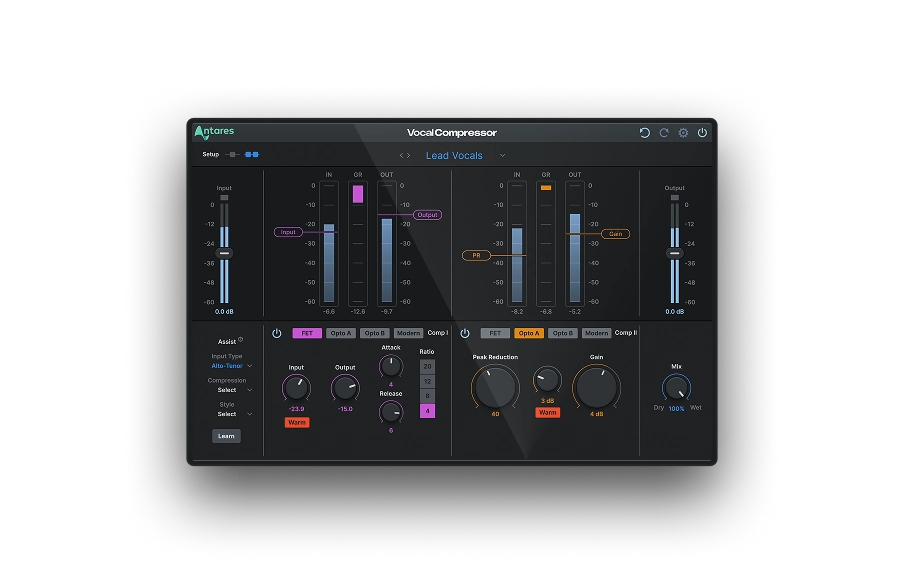
Often, adjusting vocals is the most complex step when mixing a song, so you’ll need a professional toolkit to craft an exceptional voice. Luckily, Antares has developed revolutionary effects that can magnify the characteristics of vocals and bring to life a unique sound signature.
Auto-Tune Vocal Compressor, our dual-stage vocal compressor, uses cutting-edge machine-learning technology and carefully crafted presets to give you everything you need to create a unique vocal style. Plus, you can enhance the authenticity of your voice through the built-in Warm vocal effect and its natural tube saturation and harmonics.
Vocal De-Esser, on the other hand, is the ultimate plug-in to remove or mitigate vocal sibilance in your tracks. A combination of compression and a variable-frequency high-pass filter ensure unwanted sibilance is removed while leaving the rest of your vocal performance untouched.
Over the past few months, we’ve written a few in-depth articles on the beauty and complexity of audio mixing, so if you want to find out more on this crucial topic for music production, we’d recommend reading the following articles dedicated to specific aspects of the mixing practice:
- Mixing Vocals In 7 Steps
- The Basics Of Using A High-Pass Filter in Your Mix
- The Basics Of Using Compression In Your Mix
AutoTune Unlimited
The Ultimate Vocal Production Suite
Automation In Different DAWs
Getting into detail as to how each DAW handles automation would be pointless. They're all different, but their workflow for mixing automation is quite similar. If you're a music producer or mixing engineer, automation will play a crucial role in your creative process, so my recommendation is to try multiple DAWs and see which one suits your workflow best.
Let’s look at the most popular DAWs and see what they offer.
Ableton Live
Ableton is known for its intuitive interface and powerful automation. It's a great choice for producers and engineers across all disciplines for a variety of reasons, including:
- Automation is easily accessible and can be recorded in real-time.
- It offers a variety of automation modes for precise control.
- Users can draw automation curves directly on the track.
Logic Pro
Logic Pro is another excellent all-in-one solution for artists and the most popular DAW for Mac users. Some of its most interesting features include:
- Flexible automation editing tools and precise parameter control.
- It provides comprehensive automation features with various modes.
- It allows users to record automation in real-time or manually draw it.
Pro Tools
The weapon of choice of many recording studios and professional artists, Pro Tools offers exceptional automation and customization tools, including:
- Automation editing tools like trim, split, and clear options.
- Flexible automation capabilities for detailed control.
- Multiple automation modes for various workflows.
FL Studio
Initially a popular choice mostly among electronic producers, FL Studio has become an outstanding workstation with many mixing tools to deliver professional mixes over the years. In particular:
- It features a user-friendly automation clip system for visual editing.
- Enables easy automation recording and editing.
- Offers a wide range of automation parameters for manipulation.
Studio One
Studio One’s mix automation system is as intuitive and accurate as possible. Some of Studio One's main automation features include:
- A broad range of automation tools and parameters for precise control.
- It supports automation recording, drawing, and editing with ease.
- It provides intuitive automation workflows with multiple modes.
Cubase
Cubase has been around for decades for all the right reasons: it’s a solid and resourceful workstation that empowers artists with an impressive mixing automation toolkit. For instance:
- Automation while recording and precise parameter adjustments.
- Flexible automation features with different modes.
- Comprehensive automation editing tools and options.
Final Thoughts
Understanding and implementing mix automation in audio production is vital for enhancing the quality and dynamics of your song. Whether by adjusting volume, panning, effects, or sculpting unique sounds, automation allows you to add movement to your sound project and captivate your audience.
Thanks to the intuitive interface of DAWs, exploring the world of automation has become simpler than ever. By understanding and implementing automation techniques, you can enhance the quality and impact of your mix, create seamless transitions, craft immersive sound design, and bring to life polished music productions.
Automation is not just a technical aspect of music production—it's a powerful tool for artistic expression. Embrace the potential of mixing automation, experiment with different techniques, and get creative!

Exclusive AutoTune Content

Vocal Compressor

AutoTune Unlimited

AutoTune 2026 and Metamorph
Now Included

Antares Editorial
Antares is a leading developer of software for music recording and live performance. For over 20 years, Antares has powered the music of top-charting and indie artists with products including the industry standard for pitch correction, AutoTune™.